


Introduction
A bounce is the receiving side telling you, in a fairly standard format, exactly why it did not take your message. Most people never read that part. They see a count go up, assume the address was bad, and move on. Sometimes that is right. Sometimes the address is fine and the bounce is about the sender, and suppressing the contact fixes nothing.
The short answer: look at three things in the bounce. The status code (a 5 means permanent, a 4 means temporary), the enhanced code after it (5.1.x is the address, 5.7.x is you), and the server's own sentence, the diagnostic. Then look at the pattern across the campaign: bounces spread across every sending domain point to the list; bounces bunched on one domain point to that sender.
What A Bounce Message Contains
A bounce reaches you in one of two ways. Either the receiving server refuses the message during the SMTP conversation and your sending server gets the reply straight away, or the message is accepted and refused further along, and a delivery status notification (DSN) arrives in the sending mailbox later. RFC 3464 defines the machine-readable part of a DSN. The fields worth reading:
| Field | Example | What it tells you |
|---|---|---|
| Final-Recipient | rfc822; [email protected] | Which address failed, after any forwarding |
| Action | failed or delayed | Failed is final; delayed means the server is still retrying |
| Status | 5.1.1 | The enhanced status code: class, subject, detail |
| Remote-MTA | dns; mx.northbay.co | Which server refused it |
| Diagnostic-Code | smtp; 550 5.1.1 The email account that you tried to reach does not exist | The receiving server's own reply, word for word |
Final-Recipient: rfc822; [email protected]
Action: failed
Status: 5.1.1
Remote-MTA: dns; mx.northbay.co
Diagnostic-Code: smtp; 550 5.1.1 The email account that you tried to
    reach does not exist.
Hard Bounce Or Soft Bounce?
A hard bounce is permanent: a 5xx reply, and when the enhanced code is 5.1.x, the address itself does not work. Stop mailing it. A soft bounce is temporary: a 4xx reply such as a busy server, a rate limit or a full mailbox, and the same message may be delivered later. Two exceptions catch people out: a full mailbox reported as 552 5.2.2 is still a real person, and a 5.7.x rejection is permanent for this message from this sender but says nothing bad about the address. The full reference, code by code, is in email bounce codes.
The Common Reasons, And What Each Looks Like
| Reason | Typical bounce | Address problem or sender problem? |
|---|---|---|
| The mailbox does not exist | 550 5.1.1 | Address: remove it |
| The domain does not exist or takes no mail | 550 5.1.2, 5.1.10 | Address: remove it, check for a typo |
| The mailbox is full | 452 4.2.2, 552 5.2.2 | Neither: retry later |
| You are sending too fast | 421 4.7.28, 421 RP-001 | Sender: slow down |
| Your mail failed authentication | 550 5.7.26 | Sender: fix SPF, DKIM and DMARC |
| Your IP or domain is on a blocklist | 554 5.7.1 … blocked using … | Sender: get delisted |
| The message was too big | 552 5.3.4 | Message: send it smaller |
Read The Pattern, Not Just One Bounce
One bounce tells you about one address. A campaign's bounces, taken together, tell you where the problem is.
- Mostly 5.1.1, spread across every sending domain: the list. Old exports, scraped or guessed addresses. Verify the rest before sending more; how to clean an email list has the order.
- Mostly 5.7.x, bunched on one sending domain: that domain. Check its authentication and whether it is listed; email blacklist removal covers the portals.
- Mostly 4xx rate limits at one receiving provider: your pace. Spread the campaign out; email throttling for cold email explains how.
- Bounces concentrated on one recipient company: that company's mail server or filter. Pause sends to that domain and look at the diagnostic text.
To see this, you need to filter a campaign's recipients by the domain that sent to them and see the bounce code next to each one. A single bounce count for the whole campaign hides every one of these patterns.
What To Do With Each Kind
- Hard bounces on the address: suppress the address everywhere, not just in this campaign.
- Soft bounces: let them retry. If the same address soft-bounces campaign after campaign, it is probably abandoned.
- Policy rejections: keep the contact, fix the sender, then send again.
- A bounce rate that keeps climbing: stop the campaign and find out why before sending more. An automatic stop on a high bounce rate does this without waiting for you.
Email Bounce Questions
Why Did My Email Bounce When The Address Is Correct?
Because the receiving server refused the sender, not the address. Look for a 5.7.x code or words like "blocked", "policy", "unauthenticated" or a blocklist name in the diagnostic. Fix authentication or the listing and the same address will usually accept your mail.
Why Did A Bounce Arrive Hours Later?
The message was accepted by one server and refused by another further along, or the sending server kept retrying a temporary failure until it gave up. Both produce a delivery status notification rather than an immediate refusal.
What If The Bounce Has No Code At All?
Read the diagnostic text. "User unknown", "no such user" or "does not exist" is a hard bounce on the address; "blocked", "spam" or "policy" is about the sender.
Reading Bounces In Eklow
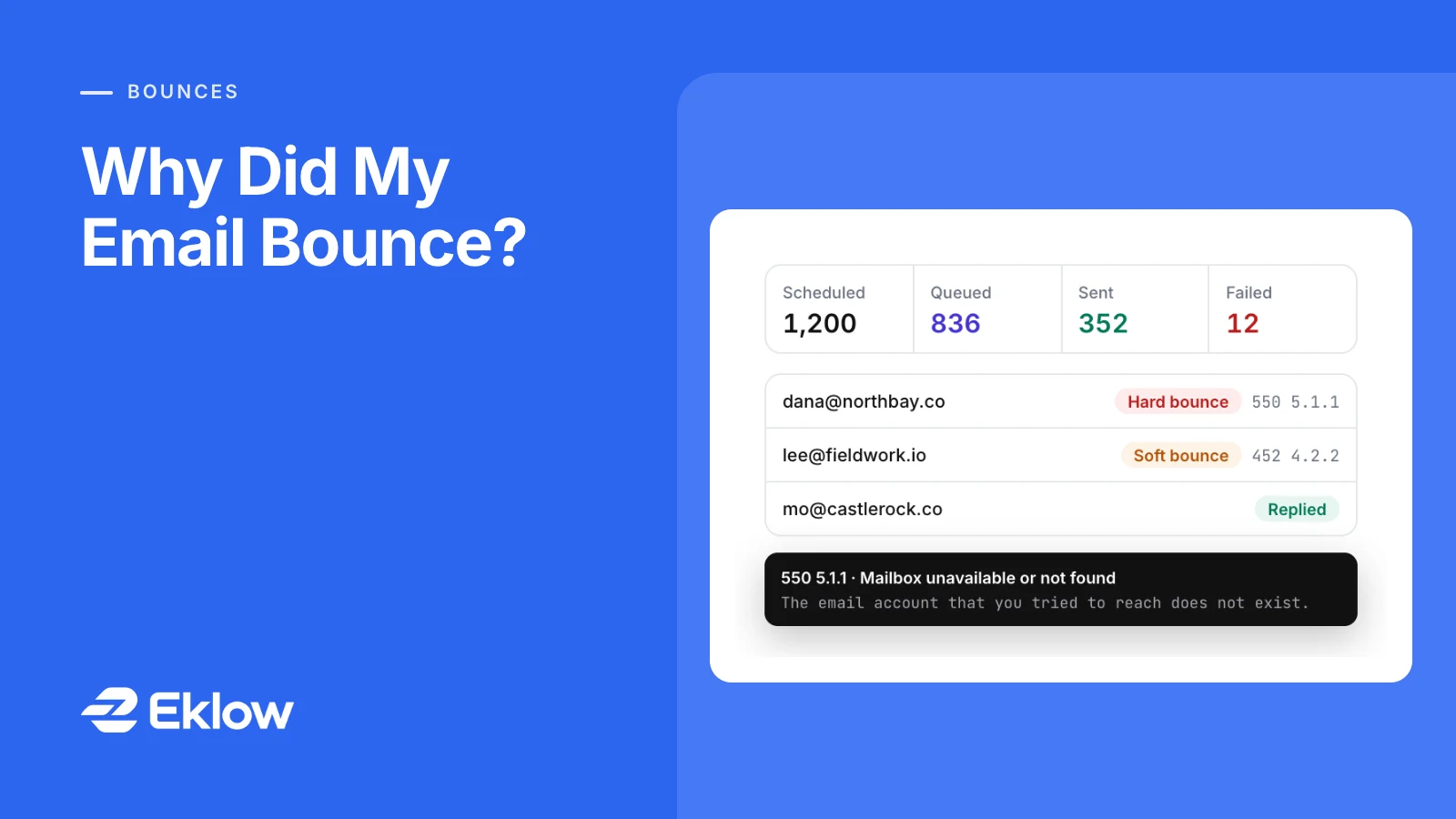
Every campaign has a Recipients tab. It opens with a summary of the send queue: Scheduled (everyone the campaign will send to, including contacts not queued yet), Queued with the time of the next send, then Sent, Failed and Canceled. Click a card to filter the list to it. When nothing is moving, plain notes underneath say why, for example that the campaign is outside its send window and when the next email is due.
Each recipient's status shows the outcome rather than just the last step: a contact who replied reads Replied, and a bounced one reads Hard bounce or Soft bounce with its code beside it, such as 550 5.1.1. Hover over it to see what the code means and the receiving server's diagnostic, word for word. When the campaign sends from more than one domain, a sending-domain filter narrows the list to the recipients one domain sent to, which is how you tell a list problem from a domain problem. Eklow reads bounces both from the SMTP reply and from the bounce reports that land in a connected mailbox with inbox access, and a recorded bounce adds the address to your suppression list and cancels the contact's remaining steps.
Keep reading
- DeliverabilityIs My Domain Hurting My Deliverability? A Domain Reputation Check, Signal By SignalHow to check your domain's reputation as an email sender: the public signals receivers can see, how to read each one by hand, and what to fix first when your domain is the problem.5 min read
- DeliverabilityChoosing An Outreach Email Tool: What Actually Affects Inbox PlacementComparing outreach and email marketing tools? The features that change whether mail reaches the inbox, the ones that only look good in a demo, and questions to ask before you pay.4 min read
