


Introduction
A bad list does its damage fast. Every message to a dead address is a hard bounce your sending domain has to answer for, and on a campaign that runs while you are in meetings, the first hour can bounce a hundred times before anyone looks. The fix is not watching harder. It is a rule that stops sending by itself when the numbers go wrong.
The short version: set a bounce rate limit and a spam complaint rate limit on every campaign, only judge the rate once enough messages have gone out to mean something, and decide in advance whether crossing the line should stop the whole campaign or only the sending domain that crossed it. Then, before resuming, find out why.
Why Pause Automatically
- Bounces arrive while the campaign is still running. Most hard bounces come back within seconds or minutes of sending, so the bounce rate is one of the few signals you can act on mid-campaign.
- Every send after the problem is pure cost. Once a list is known to be bad, the remaining messages add bounces without adding replies.
- Complaint limits are strict. Google's sender guidelines ask senders to keep the user-reported spam rate below 0.10% and never reach 0.30%. A rule that waits for a person to notice will be late.
- People are not on call. A rule works at 2 a.m. in the recipient's time zone.
Which Thresholds To Use
There is no published bounce limit from Gmail, Outlook.com or Yahoo, so every bounce threshold is a working line rather than a rule. Complaints are different: Google publishes its numbers. A sensible starting point:
| Signal | Starting limit | Why |
|---|---|---|
| Bounce rate | 2% to 5% | A verified list should bounce far less than this. Above it, something is wrong with the list, its source or its age. Use the low end on new domains |
| Spam complaint rate | 0.1% to 0.3% | Google's own lines: below 0.10% to be safe, 0.30% never to be reached |
Work out what your current campaigns run at with the email bounce rate calculator and the spam complaint rate calculator before you pick a number. A limit set just above your normal rate catches real problems without pausing healthy campaigns.
Wait For Enough Sends Before Judging
A rate over a handful of messages is noise. One bounce in the first 16 sends is a 6.3% bounce rate; one in the first 10 is 10%. A rule that fires on that will pause perfectly good campaigns every time an early contact happens to have left their job.
So a bounce rule needs a minimum sample before it is allowed to fire. Twenty sends is a reasonable floor: one bounce in 20 is 5%, which is the kind of rate you would want to look at anyway, and the rule still trips early enough to save most of the campaign. The same floor protects the complaint rule, where a single complaint on a small send would otherwise look catastrophic.
Count The Rate Correctly
The bounce rate is bounced messages ÷ messages sent. One detail is easy to get wrong: a message refused during the SMTP conversation never counts as "sent" in many systems, because it never left. If the denominator only counts delivered mail, a domain whose every send was refused has zero sends and no rate at all, and the rule never fires for the worst case it exists for. Count a bounced message as sent for this purpose.
Stop The Domain Or Stop The Campaign?
Most campaigns send from mailboxes on more than one domain. When the rate crosses the line, there are two reasonable reactions, and the right one depends on where you think the problem is.
| Stop | What happens | Use it when |
|---|---|---|
| Only that domain | The domain whose own bounce or complaint rate crossed the limit stops sending; the campaign continues from its other domains | You want to protect each domain's reputation individually and keep the campaign moving |
| The whole campaign | Every send in the campaign stops until someone resumes it | You suspect the list itself: a bad source, an old export, a segment nobody verified |
Domain scope is judged on each domain's own numbers, so it only stops the domains that actually crossed the limit. If the list is bad everywhere, the domains will trip one after another, which is a sign to stop the campaign and clean the list. For a brand-new campaign on a list you have not used before, whole-campaign scope is the cautious choice.
What To Do After An Auto-Pause
- Read the bounces, not just the count. A wall of
5.1.1means dead addresses. A run of5.7.xpolicy rejections means the receiving servers are refusing you, not the addresses. Why did my email bounce shows how to read them per recipient. - Clean the rest of the list. Run the unsent contacts through an email verifier and remove what fails. Our guide to cleaning an email list covers the order.
- Check authentication and blocklists if the bounces are policy rejections. SPF, DKIM and DMARC and the blacklist checker cover the usual causes.
- Resume deliberately. Lower the pace or the daily cap for the first day back, and keep the rule on.
Auto-Pause Questions
What Is A Good Bounce Rate For Cold Email?
As low as a verified list allows; mailbox providers publish no figure. Eklow treats a bounce rate of 2% or more as elevated and worth a look, and most teams set their automatic stop somewhere between 2% and 5%.
Should Soft Bounces Count Toward The Limit?
If they are recorded as bounces, yes: a campaign full of soft bounces is still a campaign the receiving servers are not accepting. Read the codes before deciding what to do with the addresses, because a full mailbox belongs to a real person.
Where Do Spam Complaint Numbers Come From?
From feedback reports that a receiving provider sends back when a recipient marks a message as spam. Not every provider sends them for every kind of sender; for Gmail, the domain-level spam rate is in Postmaster Tools.
How Auto-Stop Works In Eklow
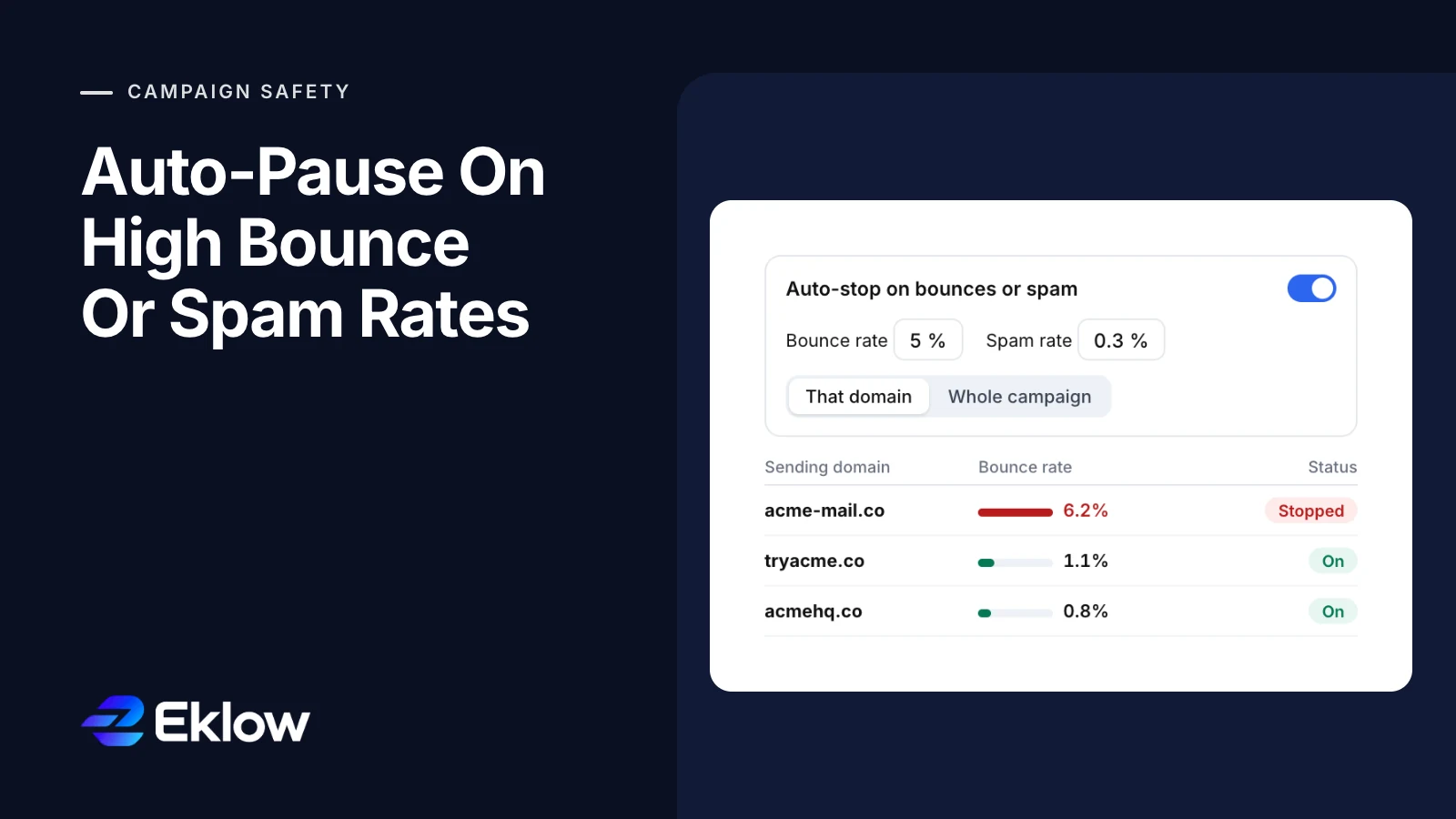
On a campaign's Sending tab, under Daily cap per domain, switch on Auto-stop on bounces or spam. Type a bounce rate and a spam rate, or pick a preset (2, 3, 5, 8 or 10% for bounces; 0.1, 0.3, 0.5 or 1% for spam). A new rule starts at 5% and 0.3%, and you can leave either field empty to watch only the other. Then choose what to stop: That domain or Whole campaign.
The rule is checked every time a bounce or a spam complaint is recorded for the campaign, and never before 20 sends. Bounced messages count as sent in the denominator, so a domain whose sends were all refused still has a rate. With That domain, the rate is the domain's own within the campaign; when it crosses the limit, that domain is switched off in the Daily cap per domain table, marked Stopped, and the campaign carries on from its other domains. Turn it back on in the same table once it is fixed. With Whole campaign, the campaign is paused, and you resume it from the campaign page. Either way, workspace admins get one notification naming the rate and the limit, for example "Bounce rate reached 6.2% (limit 5%)". Separately, every campaign notifies admins the first time its bounce rate reaches 2%, whether or not auto-stop is on.
Keep reading
- DeliverabilityIs My Domain Hurting My Deliverability? A Domain Reputation Check, Signal By SignalHow to check your domain's reputation as an email sender: the public signals receivers can see, how to read each one by hand, and what to fix first when your domain is the problem.5 min read
- DeliverabilityChoosing An Outreach Email Tool: What Actually Affects Inbox PlacementComparing outreach and email marketing tools? The features that change whether mail reaches the inbox, the ones that only look good in a demo, and questions to ask before you pay.4 min read
