


Introduction
You check your mail server's IP in one blacklist checker and it says clean. A second one shows three red rows. A third flags the address of your website, which does not send mail at all. All three claim to check the same lists, and you are left wondering which one to believe and whether you have a problem.
To make sense of that, start with what a DNSBL is. A DNSBL (DNS-based blocklist, also called an RBL or blacklist) is a list of IP addresses or domain names published in the DNS. A receiving mail server reverses the sender's IP, adds the list's zone name, and makes an ordinary DNS query. An answer such as 127.0.0.2 means listed; "no such name" means not listed. The rules are written down in RFC 5782, and most disagreements between checkers come from ignoring them.
How A DNSBL Lookup Works, Step By Step
Say a server at 192.0.2.99 connects to deliver a message, and the receiver uses a list published at bl.example.net. The receiver:
- Reverses the four parts of the IP: 192.0.2.99 becomes
99.2.0.192. - Adds the list's zone:
99.2.0.192.bl.example.net. - Asks the DNS for an A record at that name.
- Reads the answer: any A record means the address is listed, and NXDOMAIN ("no such name") means it is not.
- Optionally asks for a TXT record at the same name, which RFC 5782 says lists should publish to explain the listing.
Because it is plain DNS, you can run the same lookup yourself. Here is SpamCop answering for the RFC test address, run on 11 October 2026:
$ dig +short 2.0.0.127.bl.spamcop.net A
127.0.0.2

$ dig +short 2.0.0.127.bl.spamcop.net TXT
"Blocked - see https://www.spamcop.net/bl.shtml?127.0.0.2"

$ dig 1.0.0.127.bl.spamcop.net A | grep status
;; ->>HEADER<<- opcode: QUERY, status: NXDOMAIN
The answer is cached like any DNS record, so a busy mail server does not hammer the list. That caching is also why a removal can take a while to be seen everywhere: RFC 5782 asks lists to choose time-to-live values that reflect how often their data changes, and clients must discard expired records.
What DNSBL Return Codes Mean
The address that comes back is a code, not a real server. RFC 5782 says the A record must not be used as an address and that values should sit in the 127.0.0.0/8 range so they never route anywhere. 127.0.0.2 is the conventional "listed" value, and lists with several sublists use other values to say which one matched.
| Answer | What it means | Example |
|---|---|---|
| NXDOMAIN | Not listed, if the list is working | Any clean address |
| 127.0.0.2 | Listed; the most common single value | SpamCop, Barracuda, PSBL |
| Other 127.0.0.x values | Listed on a particular sublist or for a particular reason | A combined list returning a different code per sublist |
| Several A records at once | Listed on more than one sublist | One answer per sublist |
| A bitmask value such as 127.0.0.6 | Sublists 2 and 4 combined in one answer (RFC 5782 §2.3) | Lists that add their sublist bits together |
| A refusal code | The list refused the query; tells you nothing about the address | Spamhaus's 127.255.255.254 for public resolvers |
There is no global table of codes. Each operator documents its own, so a value that means "spam source" on one list may mean "dynamic address" on another. Read the code against the list that returned it.
IP Lists, Domain Lists And IPv6
Not every DNSBL lists IP addresses. RFC 5782 describes three shapes, and a good checker queries each one in its own way:
- IPv4 lists use the reversed address, as above.
- IPv6 lists reverse all 32 hex digits of the address, one per label, the same way reverse DNS does (§2.4). A list with no IPv6 data cannot say anything about an IPv6 address, and querying it anyway invites a false "clean".
- Domain lists, often called URI or right-hand-side lists, put the domain name itself in front of the zone, so
example.com.dbl.example.net(§3). They catch domains in the From address and in links, and they follow a domain to any mail server.
The Test Entries Every List Must Publish
This is the part of the standard most checkers skip. RFC 5782 §5 requires every IPv4 list to contain an entry for 127.0.0.2 and never one for 127.0.0.1. IPv6 lists use the mapped equivalents (::FFFF:7F00:2 and ::FFFF:7F00:1), and domain lists must list TEST and never INVALID. The point is stated plainly: one entry that must exist and one that must not let a client confirm the list is still alive and answering honestly.

The standard goes further: clients should check these entries periodically and should not use a list that lacks correct test entries (§5 and §7). Lists do shut down, and a dead zone often answers "no such name" for everything, which reads exactly like clean. When we queried NiX Spam's old zone, ix.dnsbl.manitu.net, on 11 October 2026, its own test entry came back SERVFAIL. A checker that does not test the entries first will happily report every address clean on a list like that.
Why Blacklist Checkers Give Different Answers
Back to the three checkers that disagreed. Almost every disagreement has one of four causes.
The Query Went Through A Public Resolver
Several lists refuse or rate-limit queries from big public resolvers, because they cannot tell who is asking. The same query can therefore get different answers depending on the path. On 11 October 2026, the ZEN test entry through one public resolver came back as a refusal, and through another as three real listing codes:
$ dig @1.1.1.1 +short 2.0.0.127.zen.spamhaus.org
127.255.255.254

$ dig @8.8.8.8 +short 2.0.0.127.zen.spamhaus.org
127.0.0.4
127.0.0.10
127.0.0.2
Spamhaus documents 127.255.255.254 as "query via public/open resolver" in its DNSBL usage FAQ and recommends running your own DNS server for these lookups. A checker that treats any answer as a listing shows that refusal as red; one that treats every non-listing as clean shows it as green. Both are wrong.
A Dead List Read As Clean
As above: without the test entries, a shut-down list looks identical to a clean result. A long list of green rows is only as good as the number of lists that actually answered.
The List Covers A Whole Range
Some lists name an address because of its neighbours. UCEPROTECT Level 2 lists an allocation and Level 3 a whole provider network, and policy lists cover ranges that should not send mail directly. These answers are real listings, but they say something about the provider, not about you. A checker that shows them in the same red as a spam listing makes a shared hosting address look like a disaster.
The Wrong Address Was Checked
Entering a domain into a checker raises a question: which addresses does it check? The website's A record is the easiest to find and usually the least relevant, because the web host rarely sends your mail. What matters is the address that delivered the message, the servers your SPF record names, and the domain itself on domain lists. If your mail goes through Google Workspace or Microsoft 365, the sending addresses are shared, and the provider manages them.
Which Address Should You Check?
- The domain in your From address and in your links, against domain lists. This one moves with you when you change provider.
- The IP that actually delivered a message, read from the message headers. The free email header analyzer lists every hop and checks each IP against blocklists.
- Addresses written into your SPF record as
ip4:orip6:, because those are servers you run or rent. - Your MX servers, mainly for context: they receive mail and only matter for sending if they also send.
A clean result on all of these and mail still in spam usually points somewhere else: complaints, authentication or a new domain with no history. Deliverability metrics that matter covers what to measure instead.
DNSBL Questions
Is A DNSBL The Same As An RBL?
In everyday use, yes. RFC 5782 explains that the first DNS blocklist was the Realtime Blackhole List, and that while people call every DNS blocklist an RBL, the term properly refers to the MAPS RBL. DNSBL, blacklist and blocklist all mean a list published in DNS that mail servers query; RFC 5782 calls allowlists DNSWLs.
What Does 127.0.0.2 Mean In A DNSBL?
As an answer, 127.0.0.2 is the usual code for "listed". As a question, it is the test address: RFC 5782 requires every IPv4 list to list 127.0.0.2 and never 127.0.0.1, so checking it shows whether a list is working. Neither use refers to a real server; 127.0.0.0/8 is the loopback range.
What Is The TXT Record On A DNSBL Listing?
It is the list's explanation. RFC 5782 says blocklists should publish a TXT record next to each listing describing the reason, often with a link to the lookup or removal page. Clients must check the A record and may read the TXT record, so the TXT is the quickest way to find out why you are listed and where to go next.
Can A DNSBL List A Private IP Address?
Not usefully. Lists record public addresses seen on the internet, and receiving servers only query the public address that connected to them. A 10.x, 172.16-31.x or 192.168.x address in a header is an internal hop. Find the first public address in the Received chain, which is the one receivers would look up.
How Eklow Handles This
The free blacklist checker is built on the rules above. Every lookup goes through our own resolver, never a shared public one. Before a list's "not listed" is trusted, its RFC 5782 test entries must answer correctly: the listed entry must come back listed and the clear entry must come back empty, checked within the last ten minutes. A list that fails, refuses, or times out is shown as Not Checked with the reason, and IPv6 addresses are only checked on lists whose own IPv6 test entry works. Lists that cover a provider's range are marked as context, apart from listings that point at you.
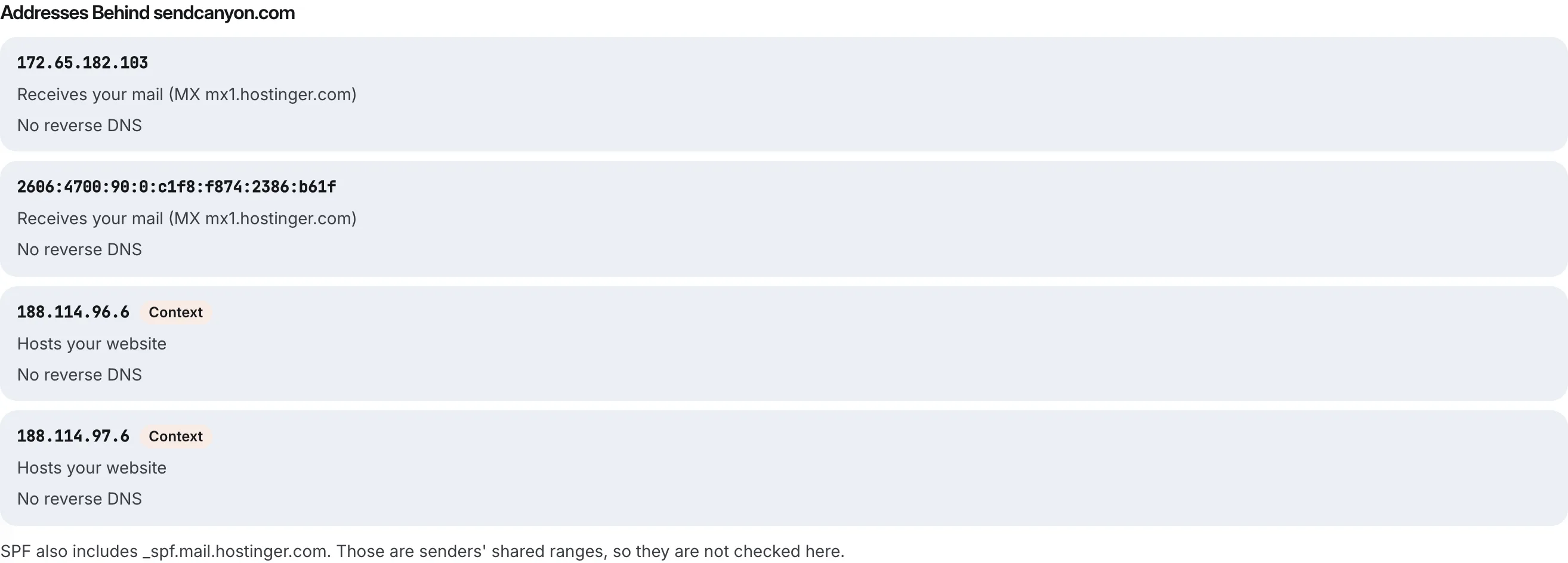
For a domain, it looks up the servers in the MX record and the addresses in the SPF record, labels each one, and shows its reverse DNS. Inside Eklow, the same blocklist checks run in every inbox placement test, against the IP that actually sent the test message, the From domain, the DKIM signing domains and the domains of your links. Where a list will not answer, the test shows it as unavailable, never as clean.
Keep reading
- DeliverabilityIs My Domain Hurting My Deliverability? A Domain Reputation Check, Signal By SignalHow to check your domain's reputation as an email sender: the public signals receivers can see, how to read each one by hand, and what to fix first when your domain is the problem.5 min read
- DeliverabilityChoosing An Outreach Email Tool: What Actually Affects Inbox PlacementComparing outreach and email marketing tools? The features that change whether mail reaches the inbox, the ones that only look good in a demo, and questions to ask before you pay.4 min read
