


Introduction
Your designer sent the logo as an SVG, exactly as asked. You hosted it, published the BIMI record, and the validator came back red: wrong version, wrong profile, no title, unsupported elements. The file opens fine in every browser, so it is hard to see what is wrong with it, and the design tool has no button labelled "BIMI".
Nothing is wrong with the artwork. BIMI requires SVG Tiny PS, a stripped-down profile of SVG built so a mail client can display a logo without running code or fetching anything. To convert a logo to SVG Tiny PS, you set version="1.2" and baseProfile="tiny-ps", add a title, remove x and y from the root, and delete everything the profile does not allow: scripts, animation, embedded images, links, styles and editor metadata. Then make it square and give it a solid background.
Why BIMI Needs A Special SVG Profile
A full SVG file can contain JavaScript, load images and fonts from other servers, animate, and link out. Rendering that inside an inbox would let any sender run code or track opens through the logo. The SVG Tiny PS draft starts from SVG Tiny 1.2 and removes every feature that could do either. What is left is plain shapes, paths, gradients and text, which is all a logo needs.
The profile matters twice. Mailbox providers validate the hosted file, and a certification authority embeds the same SVG in your VMC or CMC, so a file that fails the profile blocks both the logo and the certificate.
The SVG Tiny PS Rules For A BIMI Logo
These are the rules that decide whether a logo passes. Rows marked Profile come from the SVG Tiny PS draft itself; the others come from Google's Create a BIMI SVG file page and the BIMI Group's guidance.
| Rule | Required by | What to look for in your file |
|---|---|---|
version="1.2" on the svg element | Profile §2.1 | Exports usually say 1.1 |
baseProfile="tiny-ps" | Profile §2.1 | Missing, or tiny instead of tiny-ps |
One non-empty <title>, first inside svg | Profile §2.1 | Usually missing; keep it to 64 characters |
No x or y on the svg element | Profile §6.2 | x="0px" y="0px" from the export |
No scripts, animation, <image>, <a>, <style> | Profile §2.3 | Event handlers such as onload, embedded PNGs, CSS classes |
| No references to other files | Profile §2.3 | Any href that does not start with # |
| 32 KB or smaller | Profile §2.4, Gmail | Large path data from auto-tracing |
| Absolute width and height of at least 96 px | Gmail | Only a viewBox, or sizes in percent |
| Square, centred, solid background | BIMI Group, Gmail | A wide wordmark on a transparent canvas |
A <desc> element | Gmail | Missing; it helps screen readers |
Google also asks you to turn text into outlines rather than keeping it as live text. The profile allows <text>, but a mail client rendering your logo may not have your font, so outlines are the safer choice.
A Typical Export, Before And After
Here is the kind of file a vector editor produces. It is a valid SVG and displays correctly in a browser, and it fails eight separate checks.
<?xml version="1.0" encoding="utf-8"?>
<!-- Generator: Vector editor -->
<svg version="1.1" id="Layer_1" xmlns="http://www.w3.org/2000/svg"
  x="0px" y="0px" viewBox="0 0 200 100"
  style="enable-background:new 0 0 200 100;" onload="init()">
  <g data-name="mark">
    <rect width="200" height="100" style="fill:#1d3557"/>
    <a href="#top"><circle cx="100" cy="50" r="30" style="fill:#f1faee"/></a>
    <animate attributeName="r" from="30" to="40" dur="1s"/>
  </g>
</svg>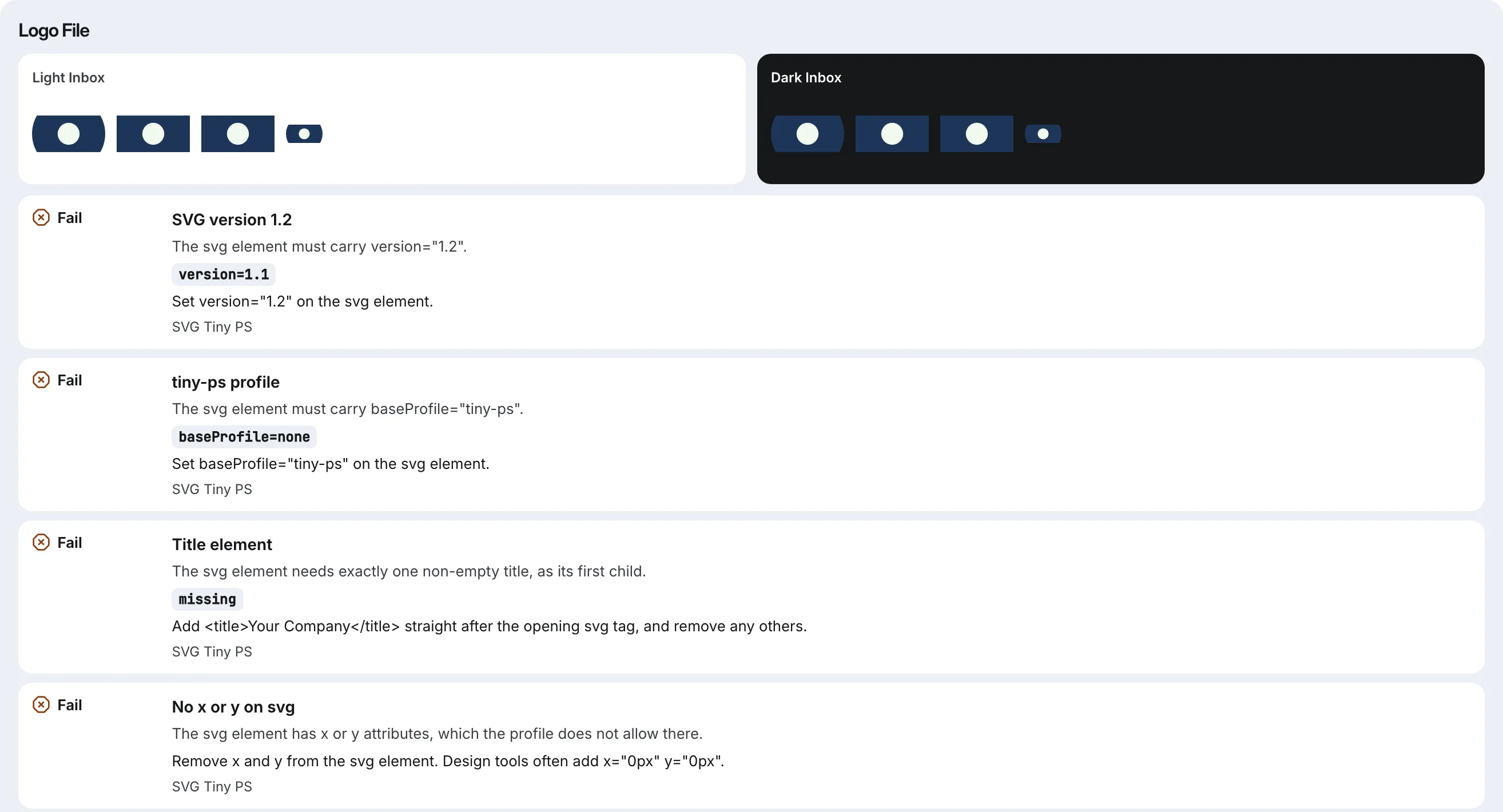
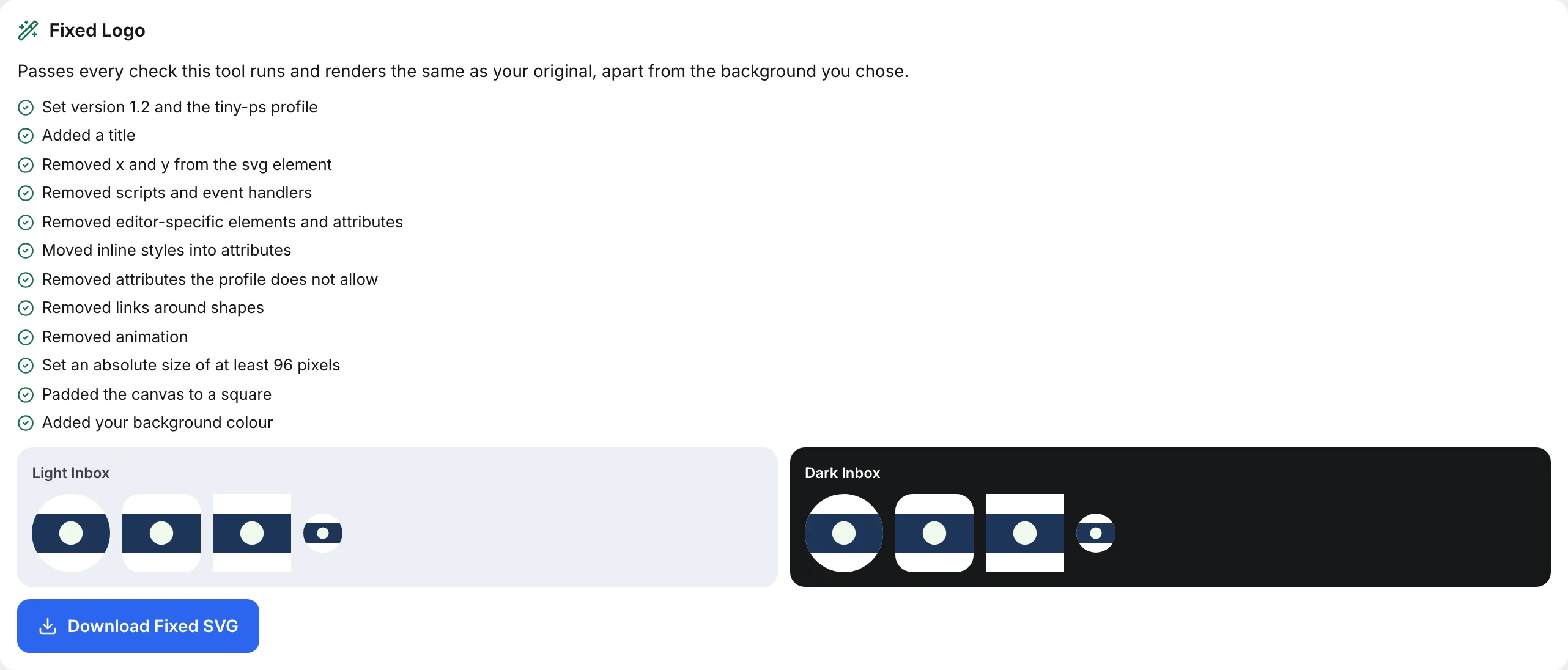
And here is the same logo converted. The artwork has not changed: the coloured rectangle and circle are identical. The canvas was padded to a square by widening the viewBox, and a white background fills the padding.
<svg xmlns="http://www.w3.org/2000/svg" version="1.2" baseProfile="tiny-ps"
  viewBox="0 -50 200 200" width="96" height="96">
  <title>Example Co</title>
  <desc>Logo for Example Co</desc>
  <rect x="0" y="-50" width="200" height="200" fill="#ffffff"/>
  <g>
    <rect width="200" height="100" fill="#1d3557"/>
    <circle cx="100" cy="50" r="30" fill="#f1faee"/>
  </g>
</svg>
How To Convert A Logo To SVG Tiny PS By Hand
Start from vector artwork, never from a PNG or JPG. Tracing a bitmap produces an approximation, and a CA checks your SVG against your registered or published mark. Then work through the file in a text editor:
- Export as SVG Tiny 1.2 if your editor offers that profile; Google's guide describes this route. Otherwise export plain SVG and continue.
- Fix the root element. Set
version="1.2"andbaseProfile="tiny-ps", and deletex,y,id,styleandenable-background. - Add a title and a description straight after the opening tag: your company name, then a short description of the logo.
- Move styles into attributes. Replace
style="fill:#1d3557"withfill="#1d3557", and resolve any CSS classes in a<style>block onto the elements that use them, then delete the block. - Delete what the profile forbids: comments, the XML declaration's editor notes,
<script>,on…attributes,<animate>,<a>wrappers (keep their contents),<image>, and anything in an editor namespace such assodipodi:orinkscape:. - Make it square. Widen the shorter side of the viewBox so the mark sits centred, and add a full-size
<rect>as a solid background. - Set an absolute size, such as
width="96" height="96", and confirm the file is under 32 KB.
Then check the result in two ways: open it in a browser to confirm it looks right, and run it through a validator, because a file can look perfect and still carry a forbidden attribute.
Design For The Avatar Slot, Not The Letterhead
Mail clients crop BIMI logos into circles, rounded squares or squares, often at around 40 pixels on a phone. A horizontal wordmark shrunk into a circle becomes unreadable. If your brand has a symbol or monogram, use that. Keep the important part away from the corners so a circular crop does not cut it, and choose a background colour that holds up in both light and dark inboxes, because a transparent logo may sit on either.
SVG Tiny PS Questions
What Is SVG Tiny PS?
SVG Tiny Portable/Secure is a restricted profile of SVG Tiny 1.2, defined in an IETF draft for BIMI logos. It keeps shapes, paths, gradients and text, and removes scripting, animation, embedded images and external references, so a mail client can display the logo without running code or loading other files.
Can I Convert A PNG Logo To SVG Tiny PS?
Not faithfully. The profile forbids embedding the PNG inside an SVG, and auto-tracing produces an approximation of your mark with bloated path data. Ask whoever designed the logo for the original vector file, and convert that. A CA also checks the SVG against your registered or published logo.
What Size Should A BIMI Logo Be?
Square, with an absolute width and height of at least 96 pixels for Gmail, and 32 KB or smaller as a file. Because it is a vector, the pixel size is a declaration rather than a resolution; mail clients scale it to fit the avatar slot.
Can A BIMI Logo Have A Transparent Background?
The BIMI Group and Google both recommend a solid background. Transparent areas let the mail client's own background show through, so a dark logo can disappear in a dark-mode inbox. Add a full-size rectangle in your brand colour behind the mark.
How Eklow Handles This
The free BIMI record generator takes your logo by address, upload or paste and checks it against the profile's schema of allowed elements and attributes, the required attributes, and Gmail's size rules, naming the exact attribute behind each failure. It previews the logo cropped as a circle, a rounded square and a square, on light and dark inboxes. For a vector file, it fixes what it can without changing the artwork: version and profile, a missing title, x and y, scripts, editor metadata, inline styles, the absolute size and square padding, with an optional background colour. The fixed file is checked again and compared against your original render before you can download it.
A valid logo is one part of BIMI; the other is a domain that passes DMARC at enforcement. Eklow checks SPF, DKIM and DMARC on every sending domain before campaigns use it and re-checks verified domains every six hours, and SPF, DKIM and DMARC explained for founders covers how the three fit together.
Keep reading
- DeliverabilityIs My Domain Hurting My Deliverability? A Domain Reputation Check, Signal By SignalHow to check your domain's reputation as an email sender: the public signals receivers can see, how to read each one by hand, and what to fix first when your domain is the problem.5 min read
- DeliverabilityChoosing An Outreach Email Tool: What Actually Affects Inbox PlacementComparing outreach and email marketing tools? The features that change whether mail reaches the inbox, the ones that only look good in a demo, and questions to ask before you pay.4 min read
