


Introduction
A prospect forwards you a screenshot of your own campaign. The subject reads ", a question about follow-ups": a stray comma, a double space, and no name or company in sight. Two hundred contacts in the list had no first name and no company, and every one of them got that line. The template looked perfect in the editor, because the editor showed it with your own test contact, who had every field filled.
Personalized email subject lines insert each contact's own data, such as a first name or company, through merge fields like {{first_name}}. They only work when every contact gets a line that reads well, so the safe way to write one is to use fields that are filled and clean across the list, give each field a fallback that fits the sentence, and preview the line for a contact whose fields are empty before you send. Here is how merge fields and fallbacks behave, which fields earn a place in a subject, and how to test them.
What Goes Wrong With Personalized Email Subject Lines
Almost every broken personalised subject comes from one of five causes. Each one is invisible until the email reaches a contact whose data is different from your test row:
| Problem | Template | What a contact receives |
|---|---|---|
| Empty field, no fallback | {{first_name}}, a question about {{company}} follow-ups | , a question about follow-ups |
| Misspelled tag | {first_name}}, a question for you | {first_name}}, a question for you |
| Wrong field name | A question about {{Company}} | A question about |
| Raw data | Freight audits at {{company}} | Freight audits at HARBOR SUPPLY LLC |
| Wrong field | A note for {{email}} | A note for [email protected] |
Field names are matched exactly as written, so {{Company}} and {{company}} are different fields, and a field the contact does not have is filled with nothing. A tag with one brace missing is not a tag at all, and goes out exactly as you typed it. Putting someone's own email address in the subject is technically correct and still reads like a machine wrote it.
How Merge Fields And Fallbacks Work
A merge field is a placeholder that your sending tool swaps for the contact's value when it sends. In Eklow the syntax is {{field}}, and {{field|fallback}} adds a default that is used whenever the contact's value is blank. Other tools write fields differently, so a template copied from elsewhere needs converting.
Template:       How {{company|your team}} follows up with hiring managers
Company filled: How Brightline follows up with hiring managers
Company blank:  How your team follows up with hiring managers
The built-in contact fields are first_name, last_name, company, title and email. Any other name, such as {{industry}} or {{city}}, is read from the contact's custom field of that name, and is blank for contacts that do not have it. That is the case a fallback exists for.
Write A Fallback That Fits Its Place In The Sentence
A fallback has to read naturally in exactly the spot the field sits. "there" is a fine default in a greeting ("Hi {{first_name|there}}") and a strange one at the start of a subject ("there, a question about hiring"). Read the line aloud with the fallback in place, and if it sounds odd, reword the sentence rather than the fallback.
| Template | With the field blank | Verdict |
|---|---|---|
| {{first_name|there}}, a question about hiring | there, a question about hiring | Reads oddly; reword |
| A question about hiring at {{company|your agency}} | A question about hiring at your agency | Reads well |
| {{company|Your team}}'s hiring follow-ups | Your team's hiring follow-ups | Reads well |
| Hiring follow-ups in {{city}} | Hiring follow-ups in | Broken; add a fallback or drop the field |
Which Fields Belong In A Subject Line
A field earns its place when it makes the line more specific to the reader's situation, not just more familiar. A first name proves only that you have a spreadsheet; the company, the reader's role or something you researched tells them why this email is for them.
- Company: usually the strongest, because it ties your reason to their business. "Carrier invoices at {{company|your company}}" says why you wrote.
- Job title: useful for role-based lines, as long as the titles in your list are clean. "For {{title|the person}} who signs off freight" breaks fast on messy titles, so test it.
- A researched custom field: a trigger event, a product they use, a city. These carry the most meaning and are blank most often, so they always need a fallback or a separate segment.
- First name: fine at the start of a short line, but it adds little on its own and is the field most often missing.
- Email address: leave it out of the subject.
Keep the name out of the From line, too. Google's email sender guidelines say the display name should not include the recipient's name and should not imply a reply or a threaded conversation; personalisation belongs in the subject and the body.
How To Test Personalized Subject Lines Before You Send
- Sort your list by each field the subject uses and count the blanks. That count is how many people will see the fallback.
- Fix casing and legal suffixes in the data: "HARBOR SUPPLY LLC" becomes "Harbor Supply". Your tool inserts what is stored.
- Check every tag against your tool's syntax: two braces on each side, the field name spelled the way your tool expects.
- Preview the subject for three real rows: one with every field, one with every field blank, and one with the longest company name in the list.
- Look at the longest version on a phone. A long company name can push the important words past the point where the line is cut.
Merge Field Questions
Do Personalized Subject Lines Improve Open Rates?
There is no universal figure you can rely on; it depends on your list, your offer and what the field adds. Open rates are also unreliable since privacy features started loading images automatically. Test a personalised line against a plain one on the same list and compare replies, which tell you more than opens.
What Is A Merge Field Fallback?
A fallback is the text a merge field uses when the contact's value is empty. In Eklow you write it after a pipe, as in {{company|your team}}. Without one, an empty field is replaced with nothing, which is how subjects end up with stray commas, double spaces or a sentence missing its subject.
Should I Use The First Name In A Cold Email Subject Line?
You can, but it is rarely the most useful field. A name alone does not explain why you wrote, and it is often missing or messy in bought or scraped data. The company or a researched detail usually does more work. If you do use it, give it a fallback and test the blank case.
What Happens If A Merge Field Is Empty?
Without a fallback, the field is replaced with nothing and the rest of the line is sent as it stands, gaps and all. With a fallback, the fallback text is used instead. Either way the email still goes out, so check the empty case before launch rather than after.
How Eklow Handles This
Paste a personalised line into the free email subject line generator as a starting line, or test it in the subject line tester. Both show the line for a sample contact and for a contact with every field empty, and warn when the empty version reads badly.
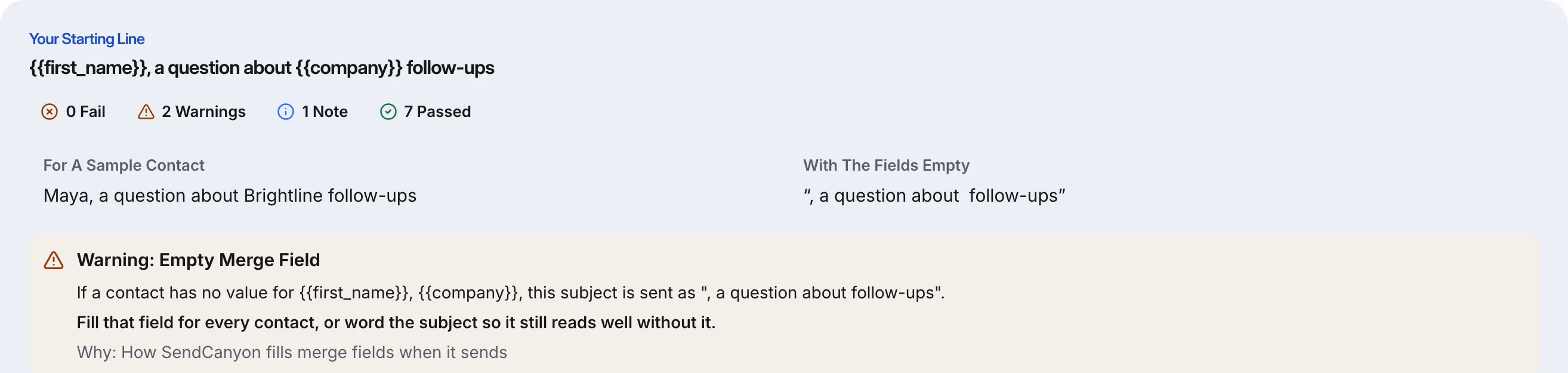

When the generator drafts new lines, you tick the merge fields it may use. A draft that uses a field you did not tick, breaks the {{field}} format, or reads badly with its fields empty is left out rather than shown.
Inside Eklow, the sequence editor previews each step as one of your real contacts, so a blank field shows up as "(no first name)" before it reaches anyone, and it warns when a tag is mistyped and would be sent as written. Clean data matters as much as the template: the contact import guide shows how CSV columns map to fields, including custom ones.
Keep reading
- Cold EmailHow To Write A Cold Email A Stranger Will AnswerHow to write a cold email a stranger will actually answer: the five parts, what each line is for, a worked example, the length that works and what to cut.8 min read
- Cold EmailSales Email Signature: What To Keep For Cold OutreachA sales email signature for cold outreach should be short, mostly text and light on links. What to keep, what to cut, and why heavy signatures cost you.6 min read
