


Introduction
The site loads with a padlock. You checked it in two browsers. Yet the webhook your CRM sends never arrives, a teammate's script fails with "unable to get local issuer certificate", and a customer on an older phone says your link shows a security warning. Three different symptoms, one cause, and your own browser is the one client that cannot show it to you.
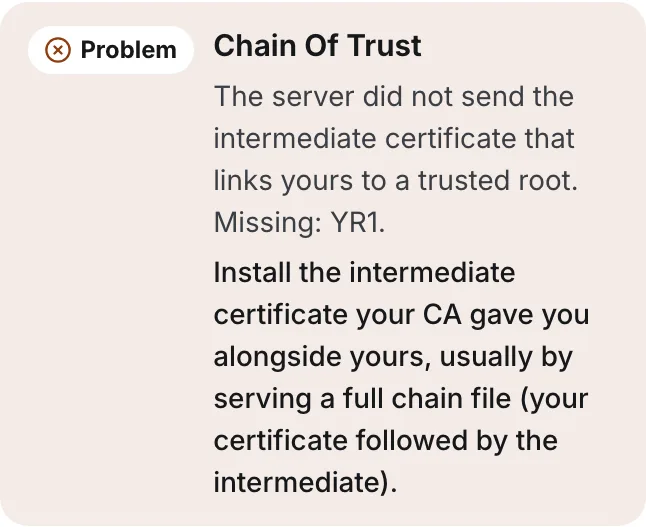
A missing intermediate certificate means the server sends its own certificate but not the intermediate CA certificate that links it to a trusted root. Clients only ship with roots, so without the intermediate they cannot build the chain and refuse the connection. Some browsers repair the gap themselves, which is why the site looks fine to you. The fix is on the server: serve the full chain, your certificate followed by the intermediate.
How A Certificate Chain Works
Root CAs almost never sign server certificates directly. They sign intermediate CAs, and the intermediates sign yours. A client trusts your certificate only if it can follow the signatures up to a root in its own trust store:
eklowlab.com            your certificate, issued by YE2
  YE2                     intermediate, issued by Root YE
    Root YE               intermediate (cross-signed), issued by ISRG Root X2
      ISRG Root X2        cross-signed by ISRG Root X1, already in the trust store
The server is expected to send everything except the root. RFC 8446, the TLS 1.3 specification, says the server's own certificate must come first, each following certificate should certify the one before it, and the root may be left out because clients already have it. Leave out the intermediate instead, and the chain breaks one step above your certificate.
Why Your Browser Hides The Error
Every certificate carries an Authority Information Access field, defined in RFC 5280, which can include a URL where the issuing CA's certificate can be downloaded. Some browsers use it to fetch a missing intermediate during the handshake. Others already hold copies of common intermediates, or cached one from another site that served it properly. Either way, the page loads and nothing looks wrong.
Most other clients do neither. Command-line tools such as curl and OpenSSL, the HTTP libraries in Node.js, Python and Go, mobile apps, monitoring services and mail servers validate only the chain the server sent against their own trust store. To them, a missing intermediate looks exactly like an untrusted certificate. That is why the problem shows up in the places a sender cares about: webhooks and API callbacks that never arrive, a link host that fails for some recipients, and an MTA-STS policy or MX certificate that sending servers reject.
How To Find A Missing Intermediate Certificate
Ask the server for its chain with OpenSSL and count what comes back. incomplete-chain.badssl.com is a public test host built to show the fault:
$ openssl s_client -connect incomplete-chain.badssl.com:443 \
    -servername incomplete-chain.badssl.com -showcerts </dev/null
verify error:num=20:unable to get local issuer certificate
verify error:num=21:unable to verify the first certificate
Certificate chain
 0 s:CN=*.badssl.com
   i:C=US, O=Let's Encrypt, CN=YR1
...
Verify return code: 21 (unable to verify the first certificate)
Read it in three lines. Only certificate 0 is listed, so the server sent one certificate. Its issuer (i:) is YR1, and no certificate with the subject (s:) YR1 follows it. The verify codes say the same thing: OpenSSL could not find YR1 locally, so it could not verify the first certificate.
To find which intermediate is missing, read the issuer URL from the certificate itself:
$ openssl s_client -connect incomplete-chain.badssl.com:443 \
    -servername incomplete-chain.badssl.com </dev/null 2>/dev/null \
  | openssl x509 -noout -ext authorityInfoAccess
Authority Information Access:
    CA Issuers - URI:http://yr1.i.lencr.org/
Compare a healthy server: Gmail's MX host returned three certificates in the same test, mx.google.com, the WR2 intermediate and a cross-signed GTS Root R1, and verified with return code 0. Extra certificates are fine, and RFC 8446 tells clients to tolerate them. Missing ones are not.
| What OpenSSL shows | What it means |
|---|---|
| One certificate, code 20 or 21 | Missing intermediate on the server |
| Two or more certificates, code 0 | Chain complete |
| Two or more certificates, code 20 on your machine only | Your local trust store or a TLS-inspecting proxy, not the server |
| Code 10, certificate has expired | A certificate in the chain is expired, sometimes an old intermediate left in the file |
| Code 18 or 19, self-signed | Not a publicly trusted certificate at all |
How To Fix An Incomplete Certificate Chain
Your CA gave you the intermediate when it issued the certificate, usually as a separate file or bundled into one called something like fullchain.pem or ca-bundle.crt. ACME clients write the full chain for you. Build the file in this order, your certificate first, and leave the root out:
$ cat example.com.crt intermediate.crt > fullchain.pem
$ openssl verify -untrusted intermediate.crt example.com.crt
example.com.crt: OK
Nginx
Point ssl_certificate at the full chain file, not the single certificate, and keep ssl_certificate_key on the private key. Then run nginx -t and reload. With Certbot, that is the difference between fullchain.pem and cert.pem in the same folder, and choosing cert.pem is the most common way this error is created.
Apache
From Apache 2.4.8, SSLCertificateFile can hold your certificate followed by the intermediate, and that is the documented way to serve a chain. Older configurations used SSLCertificateChainFile, which is deprecated. Reload Apache after the change.
Caddy
For certificates Caddy obtains itself, it serves the full chain without any setup. If you load your own files with the tls directive, the certificate file must contain the intermediate after your certificate, exactly as for nginx.
IIS
Windows builds the chain from the certificate store, not from a file. Import the intermediate into the Intermediate Certification Authorities store for the local computer, then remove and re-add the site's HTTPS binding so the server picks it up.
Mail Servers
The same rule applies on port 25. In Postfix, smtpd_tls_chain_files or smtpd_tls_cert_file should point at the full chain; in Exim and Dovecot, the certificate setting takes the full chain file too. Mail servers are the easiest place to miss this, because the web server was fixed and nobody tested the MX.
Missing Intermediate Certificate Questions
What Does Unable To Get Local Issuer Certificate Mean?
It is OpenSSL's error 20: the client could not find the certificate that issued the one it is checking, either in the chain the server sent or in its own trust store. When the server sent only one certificate, it is a missing intermediate. When the server sent a full chain, the problem is on the client, such as an outdated CA bundle.
Should The Chain Include The Root Certificate?
No. Clients trust a root because it is already in their trust store, so sending it adds bytes without adding trust. RFC 8446 allows the root to be omitted. The exception is a cross-signed root, such as GTS Root R1 above, which is sent as an intermediate so older clients can reach a root they already have.
Why Does My Site Work On Desktop But Not On Some Phones?
Usually because the desktop browser fetched or cached the missing intermediate and the phone, or an app on it, did not. Older devices and in-app browsers are less likely to repair a chain. Serving the full chain from the server fixes it for every client at once, so you do not need to work out which ones fetch.
How Eklow Handles This
The free SSL certificate checker behaves like the strict clients above. It validates only the chain the server sent and never fetches a missing certificate on the server's behalf, so an incomplete chain is reported as a problem instead of being quietly repaired. The fix it gives is written for the server software that answered when it can tell which one it is: nginx, Apache, Caddy or IIS.
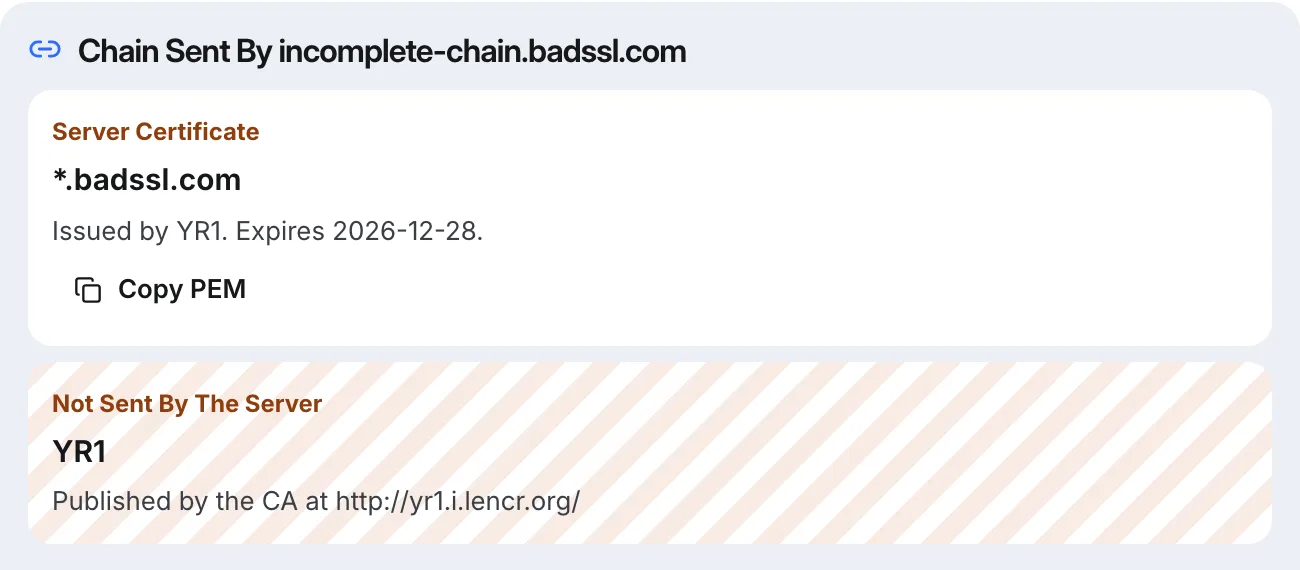
The chain view lists what the server sent in order, then marks the missing link and where the CA publishes it, so you know which file to download.
Use Website for your site and webhook endpoints, Tracking Domain for a link host, and Mail Domain to test the chain each MX host presents after STARTTLS. Inside Eklow, a custom SMTP mailbox goes through a real TLS connection and login before it is saved, so an SMTP server with a broken chain is caught at connect with the server's own error. The connect a mailbox guide walks through it, and SPF, DKIM and DMARC explained for founders covers the records a sending domain needs next.
Keep reading
- DeliverabilityIs My Domain Hurting My Deliverability? A Domain Reputation Check, Signal By SignalHow to check your domain's reputation as an email sender: the public signals receivers can see, how to read each one by hand, and what to fix first when your domain is the problem.5 min read
- DeliverabilityChoosing An Outreach Email Tool: What Actually Affects Inbox PlacementComparing outreach and email marketing tools? The features that change whether mail reaches the inbox, the ones that only look good in a demo, and questions to ask before you pay.4 min read
