


Introduction
"I've attached the pricing sheet we discussed." You hadn't. The prospect replied "No attachment?", you sent it with an apology, and the moment of momentum after a good call turned into a small admin exchange. A week earlier, a campaign went out greeting 300 people with "Hi ," because a third of the list had no first name. Neither mistake was about grammar, and neither would have been caught by a spellchecker.
To proofread an email properly, check the things that break, not just the words: the recipient and their name, every merge field filled and empty, every link, the attachment you mention, dates and days, numbers, the subject line, and the quoted thread underneath. Then read the body once for grammar and tone, preferably aloud or on your phone. It takes about five minutes, and the order matters, because the costly slips are rarely the typos. The checklist below goes through each step.
Why You Miss Mistakes In Your Own Email
You know what you meant, so your brain reads that instead of what is on the screen. A missing "not", a doubled "the" or the wrong day of the week slides past because the sentence in your head is correct. Proofreading works when it breaks that habit: change the format (read on your phone), change the speed (read aloud), or change the target (check one kind of thing at a time instead of "everything" at once).
An Email Proofreading Checklist
| Check | What Goes Wrong | How To Check |
|---|---|---|
| Recipient | Wrong person from autocomplete; a name misspelled | Read the To line and the greeting together |
| Merge fields | "Hi ," or "{{first_name}}" sent raw | Preview with a real contact and an empty one |
| Links | Wrong page, a staging link, a typo in the URL | Click every link in the sent-to-yourself copy |
| Attachments | Mentioned but not attached, or the wrong version | Search the body for "attached" and look |
| Dates and days | "Tuesday 7 October" when the 7th is a Wednesday | Check each date against a calendar |
| Numbers and prices | Last quarter's figure, a dropped zero | Compare against the source, not memory |
| Subject line | Left over from a draft, or cut off on a phone | Read it alone, as the inbox shows it |
| Quoted thread | Internal notes or another customer's details below | Scroll to the very bottom before sending |
| Grammar and tone | Real-word errors, hedges, long sentences | Read aloud once, then run a checker |
Names And Recipients First
Getting someone's name wrong is the one mistake almost nobody forgives in a first email. Check the spelling against their signature or profile, check that autocomplete chose the right Jordan, and in a reply-all check who is on the copy line. If the email goes to a list, the name comes from your data, so the proofreading moves to the next step.
Merge Fields, Filled And Empty
A campaign template is proofread twice: once as written and once as each contact will receive it. Preview it with a real contact record, then with a contact whose fields are blank. Every field should either always have a value or carry a fallback, such as {{first_name|there}}, so the greeting reads "Hi there," rather than "Hi ,". Watch for fields that change grammar: "a {{job_title}}" reads "a operations manager" for some contacts. Our template spam test guide explains why raw merge fields also look like bulk mail to filters.
Links And Attachments
Send the email to yourself and click every link from the received copy, since that is the version the reader gets. Then search the body for "attached", "attachment" and "enclosed" and look for the file. For cold email, consider whether you need either: a stranger is unlikely to open an attachment from an unknown sender, and every extra link is one more thing filters examine.
Dates, Days And Numbers
"Thursday 9 October" in an email written in a hurry is exactly the kind of detail people copy from an old draft. Check each date against a calendar, check that time zones are stated when a meeting is involved, and check numbers against the source. A price or a result that is wrong by one digit is worse than no number at all.
The Thread Below Your Reply
Replies and forwards carry the whole conversation underneath. Before sending, scroll to the bottom: internal comments, a colleague's frank aside or another customer's details have all been forwarded by accident. You did not write the quoted text and should not edit it, but you are responsible for sending it.
Grammar And Tone Last
Only now read for language, because a grammar pass is wasted on a paragraph you are about to cut. Read it aloud once; your ear catches a missing word or a doubled one that your eye skips. Then run a checker that looks at context, since mistakes such as "its" for "it's" are real words and pass a spellchecker. Keep an eye on length: a reply of five lines is easier to act on than five paragraphs.
Read It On A Phone Before You Send
Many people will first see your email on a phone. A subject line that fits on a laptop can be cut off there, a long sentence fills the screen, and a signature with three images pushes the message itself out of view. Send a test to yourself and read it on your phone once. If you are sending HTML email, our inbox placement test guide covers checking how it lands at each provider, not just how it looks.
When You Find A Mistake After Sending
Decide whether it changes the meaning. A typo that does not, such as a missing comma, needs nothing: a correction email draws more attention to it than the original did. A wrong date, price, link or attachment does need a short follow-up in the same thread: "Correction: the call is Thursday 8 October, not Wednesday. Sorry for the confusion." For a campaign, pause it, fix the template, and only then resume, so the rest of the list gets the corrected version.
Questions About Proofreading Email
How Long Should Proofreading An Email Take?
For a one-to-one email, a minute or two: names, the attachment, any dates, then one read-through. For a campaign template that will go to hundreds of people, take five to ten minutes and preview it with real and empty contact data. The cost of a mistake scales with the list, so the time should too.
Does Reading An Email Aloud Really Help?
Yes, for missing and doubled words, clumsy rhythm and sentences that are too long to say in one breath. Reading aloud slows you down enough to see what is actually on the screen rather than what you meant. It does not catch wrong names, broken links or a missing attachment, so it belongs at the end of the checklist.
Should A Grammar Checker Check My Signature?
Usually not. Names, job titles and company names trip spelling rules and produce noise. Check the signature by eye instead: phone number, title and links. The sign-off line above it, such as "Best regards,", is part of your message and should be checked with the rest.
Should I Send A Test Email To Myself First?
For anything that matters, yes. The received copy is the only one that shows exactly what the reader sees: how links behave, how the subject line is cut, whether images load and how merge fields filled in. Open it on your phone as well as your computer.
How Eklow Handles This
Our free email grammar checker is built for the last step of the checklist and stays out of the way of the rest. Before any rule runs, it sets aside merge fields such as {{first_name|there}} and {{company}}, links, email addresses, phone numbers, your signature and quoted replies from earlier in the thread, so none of them is flagged or changed. The signature is skipped by default; tick Check Signature to include it. The sign-off line itself is always checked.
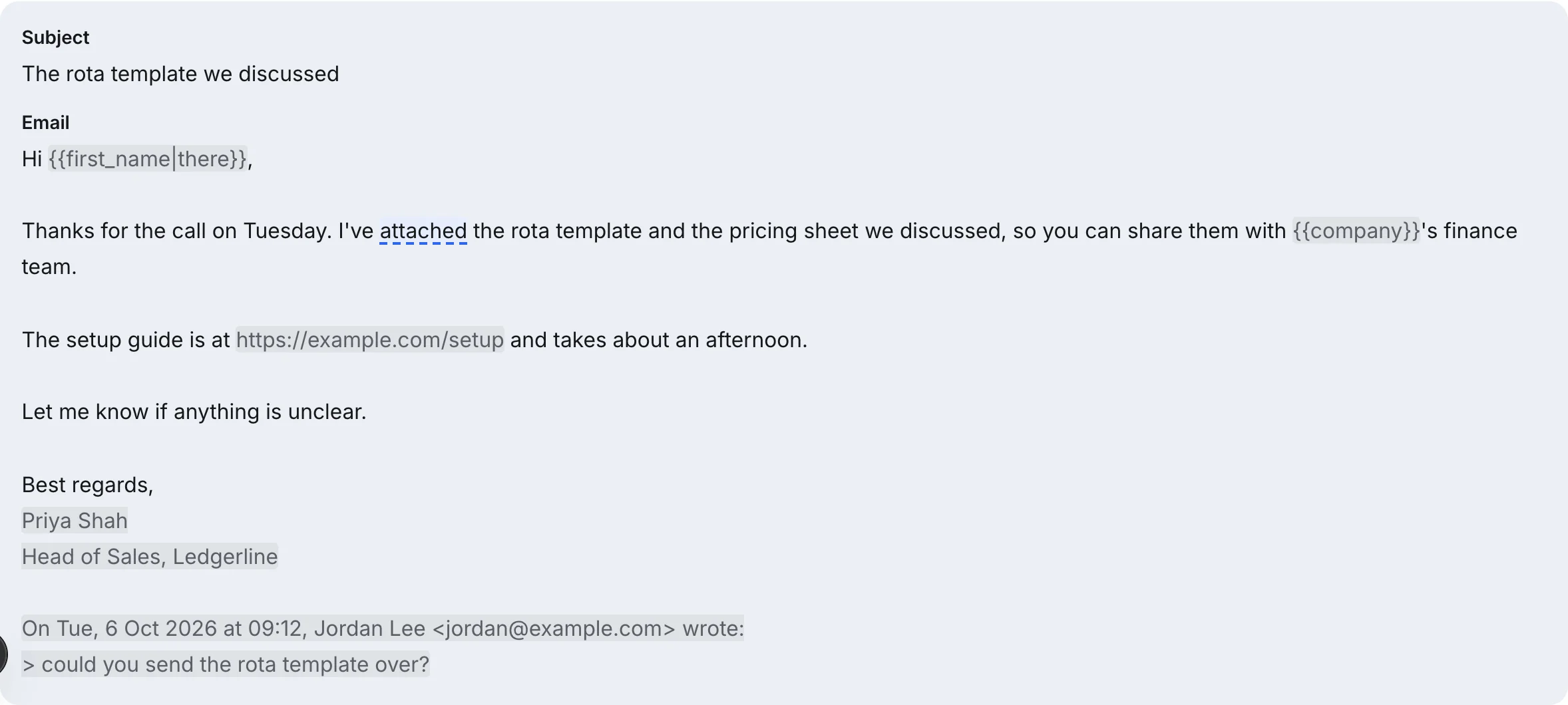
When the email mentions an attachment, the checker adds a reminder to check the file is attached before you send. Real-word errors are marked as errors, style choices as suggestions and measurable tone signals as tone notes, each with its reason and fix. Nothing changes until you accept a fix, and you can undo, compare the before and after, and copy the corrected text.
For campaigns, the sequence editor inside Eklow scores each step with the same content checks as our email template checker, including malformed merge fields, so a broken field is visible before launch rather than in 300 inboxes.
Keep reading
- CopywritingEmail Tone: The Words That Make Your Request Sound UnsureEmail tone problems you can measure: hedges like just and maybe, apologetic openers, passive voice, long sentences and too many questions. How to fix each one.7 min read
- CopywritingCommon Email Grammar Mistakes Spellcheck Lets ThroughThe common email grammar mistakes spellcheck never flags: its and it's, then and than, could of, merge fields that break agreement. How to fix each one.7 min read
