


Introduction
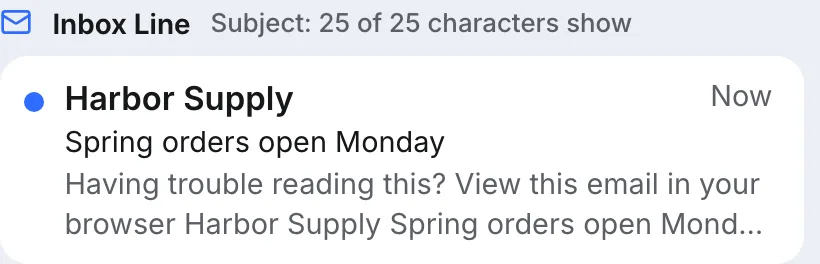
The subject line took twenty minutes. Then you open your own phone after the send and read the line underneath it: "Having trouble reading this? View this email in your browser." That is the sentence every subscriber saw in their inbox, in the one spot that decides whether they open the email. Nobody wrote it for that purpose. It just happened to be the first text in the message.
Preheader text is the short line an inbox shows after the sender and subject. Most mail apps do not read it from a header; they take the first text they find in the body of the email. If you do not put a deliberate line there, the app uses whatever comes first: a view-in-browser link, a navigation menu, an image's alt text or the greeting. To control it, add one short hidden line at the very top of the body, follow it with invisible spacer characters so the body does not run on after it, and move the view-in-browser link to the footer.
How Inboxes Pick The Email Preview Text
There is no standard field for it. RFC 5322, which defines the headers an email carries, has Subject but nothing for a preview line. So each app builds its own snippet from the message body: it strips the HTML, collapses the whitespace and shows as much of the resulting text as fits. None of the big providers publish the exact rule, and the details differ, but the behaviour you can see is consistent: the first readable text in the body wins.
How much of it shows depends on the app and the reader. Apple's iPhone User Guide says Mail shows two lines of preview by default and that readers can change it in Settings › Mail › Preview. Google and Microsoft do not document how much their apps show; expect roughly one line under the subject. The width of the phone and the reader's text size then decide how many characters that is.
What Ends Up There By Accident
Look at the top of most templates and you will find the culprit. These are the usual ones, in the order they tend to appear:
| First text in the body | What the reader sees under the subject |
|---|---|
| A view-in-browser line | "Having trouble reading this? View this email in your browser" |
| A navigation bar | "Shop · New in · Sale · Account" |
| A logo image with alt text | The company name, repeating the sender line above it |
| A heading that repeats the subject | The subject, twice |
| The greeting and first sentence | Often fine, if the first sentence was written to be read there |
Only the last row is a choice. The rest waste the line that most supports the subject.
How To Add A Hidden Preheader By Hand
A hidden preheader is a line of text placed first in the body and hidden from the opened email, so the inbox reads it but the reader never sees it twice. Several hiding properties are combined because different apps honour different ones:
<body>
<div style="display:none; max-height:0; overflow:hidden; mso-hide:all;">
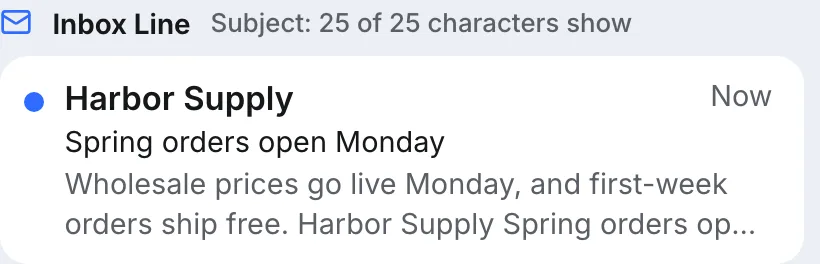
Wholesale prices go live Monday, and first-week orders ship free.
‌ ‌ ‌ ‌ ‌ ‌ ...
</div>
...- Put the
divfirst inside<body>, before any table, logo or link. - Hide it with
display:none, plusmax-height:0andoverflow:hiddenfor apps that dropdisplay:none, andmso-hide:all, Outlook for Windows' own property. - Write one sentence that adds to the subject instead of repeating it.
- Follow it with a run of spacer pairs,
‌ , repeated forty times or more. - Move the view-in-browser link to the footer, or delete it.
Why The Spacer Characters Matter
When the preheader is shorter than the space the inbox gives it, the app keeps reading into the body to fill the line. Your preview then becomes your sentence followed by "Harbor Supply Spring orders open Monday Hi Sam", the visible start of the email. The spacer run fills that space with characters that show as blanks. is a non-breaking space, and ‌ is the zero width non-joiner, U+200C in Unicode, a character with no visible width. The pairing is a convention among email developers rather than a documented rule, so confirm the result with a test send to your own phone.
How Long Should Preheader Text Be?
There is no correct number of characters, because the space depends on the phone, the app, the text size and, in Apple Mail, the reader's preview setting. What you can control is order. Put the words that matter in the first forty or so characters, and treat anything after that as a bonus for wider screens.
To give that figure some footing: in our own inbox layout, one line of preview text for a sample newsletter held 41 characters on a Samsung Galaxy S24 at 360 CSS pixels and 55 on an iPhone 17 Pro Max at 440. Real apps use their own fonts and margins, so read those numbers as the scale of the difference between phones, not as limits.
Preheader Text In Cold Email
A plain-text cold email has no HTML, so it cannot hide anything. Its preview is simply the first line of the body, which is usually the greeting. That is fine, and it changes how you write the opening: "Hi Sam," alone wastes the line, while "Hi Sam, saw Harbor Supply is opening a second warehouse" earns it.
If you do send cold email as HTML, keep any hidden preheader to one short line. Hidden text is a classic filter-evasion trick, so spam filters look at it. In the Eklow template checker, one short hidden line is a minor warning, while more than 200 hidden characters, or more than three hidden blocks, fails the check outright.
Preheader Text Questions
Is Preheader Text The Same As Preview Text?
In practice, yes. Preview text is what the inbox shows after the subject; a preheader is the line you place at the top of the email to control it. Some sending tools also offer a preview text field, which writes a hidden preheader into the HTML for you.
Why Is My Preheader Not Showing?
Usually because something comes before it in the body, such as a view-in-browser line or a logo with alt text, or because it is hidden with a method the app treats as removed content. Make it the very first element inside <body> and hide it with the combined properties above.
Should The Preheader Repeat The Subject Line?
No. The reader sees both together, so repeating the subject spends the second line on words they have already read. Use it for the next most useful fact: a date, a number, a name or the reason to open now.
Can Hidden Preheader Text Hurt Deliverability?
One short hidden line is normal in marketing email and rarely matters alone. Large amounts of hidden text are a different matter: hiding text from the reader is a known spam technique, and filters score it. Keep the preheader to one sentence plus spacers, and nothing else hidden.
How Eklow Handles This
The free mobile email preview reads your email the way an inbox does. It finds a hidden preheader at the top of the body, falls back to the first visible text when there is none, and draws the inbox line for Apple Mail, Gmail or Outlook at a real phone width. When the email has no preheader, the findings quote the exact text the inbox will show instead and say so as a warning, and a separate note flags a view-in-browser line.

When a preheader is present but body text follows it straight away, a note says so and suggests the spacer run. You can also type preview text into its own field to try wording before you edit the HTML, and the fit table shows how many characters of the subject and preview text fit on one line on each of seven phones. The tool is also in the Tools tab inside Eklow, beside the template checker that scores hidden text along with the rest of the email. Before a campaign, testing the template for spam and an inbox placement test tell you whether that preview line ever reaches the inbox.
Keep reading
- Email DesignMobile Friendly Email: Width, Font Size And Tap Targets That WorkA 600 px email on a 360 px phone gets cut off or shrunk. The widths, font sizes and tap target sizes that make a mobile friendly email, from Apple and WCAG.8 min read
- Email DesignEmail Dark Mode: Why Your Colours Flip And How To Fix ItEmail dark mode is not one thing: some apps use your dark styles, some invert part of it, some invert all of it. See why, and how to design for all three.8 min read
