



Introduction
You sent the signed contract at 14:02. The client says it arrived at 14:35, after they had already called to ask where it was. Your mail app says sent, their mail app says received, and both of you assume the other side is slow. Nobody knows, because the only record of those 33 minutes is buried in a part of the message neither of you looked at.
To find an email delivery delay, open the message's full headers, list the Received lines from the bottom up, convert every timestamp to UTC, and subtract each one from the next. The largest gap is where the message waited, and the two server names on that line tell you whose queue it was sitting in. The rest of this post shows how to do that by hand, what the common gaps mean, and when the headers show no delay at all.
Why An Email Delivery Delay Shows Up In The Headers
Every server that accepts a message adds a trace line to it. RFC 5321, the SMTP standard, says servers must prepend a Received line, must not change or delete earlier ones, and must not reorder them. Each line ends with the date and time that server took the message. So the header is a stack of receipts, newest on top, and the time between two receipts is time the message spent on one leg of the trip.
The Date field is different. RFC 5322 defines it as the moment the author marked the message complete and ready to send, which the sender's software writes. It is a useful starting point, but it records intent, not delivery. A message written at 09:00 and scheduled for 11:00 carries a 09:00 Date and a first Received line two hours later.
How To Find The Slow Hop In Received Headers
Start by getting the headers from the recipient's copy, because only that copy holds the receiving side's lines. In Gmail that is More → Show original (Google's steps); in Outlook for Windows it is File → Properties, where the text sits in the Internet headers box (Microsoft's steps). Here are the trace lines from the contract email above, sent from example.com to example.org:
Received: from mx1.example.org (mx1.example.org [198.51.100.12])
        by store.example.org with LMTP id 8kQ2Ld;
        Thu, 8 Oct 2026 14:34:54 +0000
X-Greylist: delayed 1961 seconds by postgrey-1.37 at mx1.example.org; Thu, 08 Oct 2026 10:34:52 EDT
Received: from smtp.example.com (smtp.example.com [203.0.113.40])
        (using TLSv1.3 with cipher TLS_AES_256_GCM_SHA384 (256/256 bits))
        by mx1.example.org (Postfix) with ESMTPS id 4ZkP9t;
        Thu, 8 Oct 2026 10:34:52 -0400 (EDT)
Received: from [192.168.10.4] (unknown [198.51.100.77])
        by smtp.example.com with ESMTPSA id 61f2;
        Thu, 8 Oct 2026 14:02:11 +0000
Date: Thu, 8 Oct 2026 14:02:09 +0000- Number the
Receivedlines from the bottom. The lowest one is hop 1: the laptop handing the message to the sender's own server. - Write down each timestamp, including its offset. Ignore the comment in brackets; the numeric offset is what counts.
- Convert every timestamp to UTC.
10:34:52 -0400is 14:34:52 UTC. - Subtract each hop's time from the one above it. Compare hop 1 with the
Datefield too. - Find the largest gap and read the
fromandbynames on that line. The message spent that time leaving the first server and being accepted by the second.
| Hop | From → by | Stamped | In UTC | Gap |
|---|---|---|---|---|
| Date | Lena's mail app | 14:02:09 +0000 | 14:02:09 | Start |
| 1 | [192.168.10.4] → smtp.example.com | 14:02:11 +0000 | 14:02:11 | 2 s |
| 2 | smtp.example.com → mx1.example.org | 10:34:52 -0400 | 14:34:52 | 32 min 41 s |
| 3 | mx1.example.org → store.example.org | 14:34:54 +0000 | 14:34:54 | 2 s |
The whole email delivery delay sits on hop 2, between the sender's outgoing server and the recipient's inbound server. Inside each company the message moved in seconds. That already rules out the client's mailbox and the sender's laptop.
Convert Every Timestamp To UTC First
Mixed time zones are the most common way to misread a header. Read hop 2 without converting and it looks like the message arrived three and a half hours before it was sent. RFC 5321 asks servers to write explicit numeric offsets such as -0400 rather than zone names, and RFC 5322 gives -0000 a special meaning: the time is in UTC but the server knows nothing about its local zone. Older names such as EST or GMT still turn up; treat an unknown alphabetic zone as -0000, which is what RFC 5322 says to do.
Why Is My Email Delayed? The Common Causes
Where the gap sits tells you more about an email delivery delay than how long it lasted. This is how to read the position:
| Where the gap is | Most likely cause | Who can fix it |
|---|---|---|
Between Date and hop 1 | Scheduled send, an outbox that waited for a connection, or a draft sent later | The sender |
| On the hop from the sender's server to the recipient's inbound server | Greylisting, a temporary rejection, or the sender's queue | Usually the sender's provider; sometimes the recipient's admin |
| Between two servers inside the recipient's provider | Content scanning, attachment sandboxing or an internal queue | The recipient's admin |
| Negative gap | Two servers' clocks disagree | Whoever runs the server with the wrong clock |
| No gap, but the user saw it late | The mail app fetched late, or a filter moved the message | The recipient |
Greylisting And The 30 Minute Retry
Greylisting is the classic cause of a gap of about half an hour on the hop into the recipient's server. RFC 6647 describes it: the receiving server answers an unfamiliar sender with a temporary failure and only accepts the message when the sender tries again later. Real mail servers retry; much bulk spam does not. RFC 5321 then sets the pace of that retry: after a failed attempt the sender must wait, and the interval should be at least 30 minutes.
Put those together and you get the example above: one refusal at 14:02, a retry about half an hour later, acceptance at 14:34. Some greylisting filters even say so. The X-Greylist: delayed 1961 seconds line is 32 minutes and 41 seconds, the same gap as hop 2. Later messages from the same server usually go straight through, because the receiver now knows it.
A Queue On The Sending Side
If the recipient's server answered with a temporary error for another reason, such as a rate limit or a busy server, the sender's server keeps the message in its queue and retries on its own schedule. The header looks the same as greylisting: a long gap on the hop that crosses between the two companies. The difference only shows in the sending server's logs, which will record the 4xx reply. RFC 5321 says senders generally keep retrying for at least 4 to 5 days before giving up, so a message can arrive very late without ever bouncing.
Scanning Inside The Receiving Provider
Large providers pass a message between many internal servers before it reaches the mailbox, and some of those steps scan links or open attachments in a sandbox. If the email delivery delay is between two hostnames that both belong to the recipient's provider, the message was already delivered to them and was being processed. The sender cannot change that, beyond sending fewer or smaller attachments.
Clock Skew And Negative Delays
Sometimes a hop is stamped earlier than the one before it. Mail does not travel backwards in time, so two servers disagree about the time. A gap of a few seconds is normal drift. Anything larger means one server's clock is wrong, and any email delivery delay measured across that hop is unreliable. Do not average it away or treat it as zero; measure the delay over the hops on either side of it instead.
When The Headers Show No Delay
If every gap is a few seconds, there was no email delivery delay in transit: the message reached the mailbox on time. The topmost Received line is the moment the recipient's provider stored it. A late appearance after that is the mail app: a phone that checks for new mail every 15 minutes, a laptop that was asleep, or a rule or spam filter that put the message in another folder until someone looked. In that case the fix is on the recipient's device, and the headers are your proof that the mail was not slow.
Email Delay Questions
How Long Can An Email Be Delayed Before It Bounces?
Days. RFC 5321 says a sending server should keep retrying a temporary failure and that the give-up time generally needs to be at least 4 to 5 days. Many servers send the author a delay notice earlier, but the original message stays queued. So a message can arrive a day late with no bounce in between.
Is A 30 Minute Email Delay Normal?
It is common for a first message to a new recipient domain. Greylisting refuses unfamiliar senders once, and RFC 5321 says the retry interval should be at least 30 minutes, so the first message waits about half an hour. If every message to that domain takes 30 minutes, the receiver is not remembering your server, and its admin should check why.
Why Do Received Timestamps Go Backwards?
Either the time zones were not converted, or a server's clock is wrong. Convert every timestamp to UTC using its numeric offset first. If one hop is still earlier than the hop before it, two clocks disagree. Delays measured across that hop cannot be trusted, though the hops around it still can.
Can The Sender See Where The Email Was Delayed?
Only partly. The copy in the sender's Sent folder never reached the recipient's servers, so it holds none of their Received lines. To see the full route, ask the recipient to forward the headers of their copy, or have them paste the headers into a header analyzer and share the result.
How Eklow Handles This
The free email header analyzer measures an email delivery delay for you. Paste the headers and it puts every Received line in delivery order, converts each timestamp to UTC while showing the offset it was sent in, and gives each hop its delay and its share of the total. It marks the hop where the message entered the receiving provider, so you can see at a glance which side of that line the time was lost on.
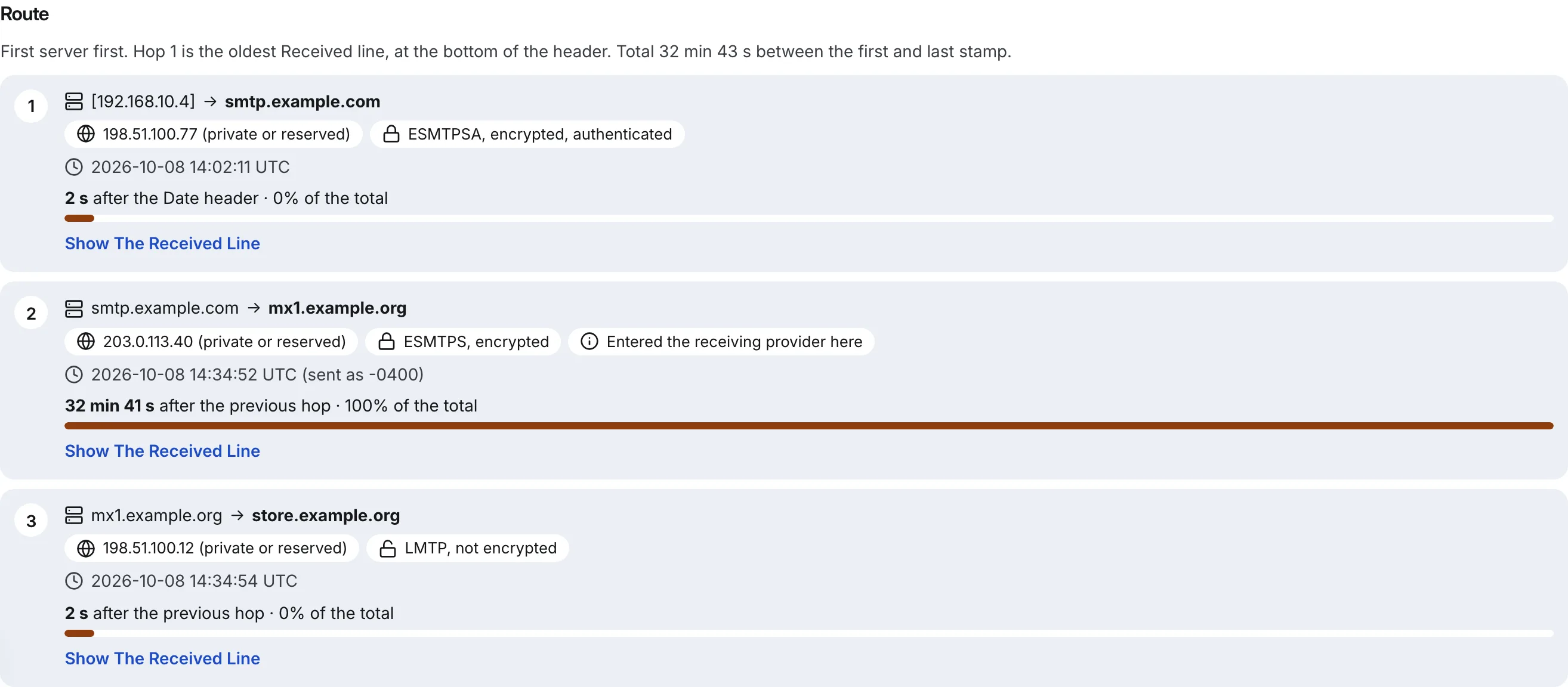
Hops that take five minutes or more get a note, and an hour or more a warning, each tied to the exact header line. A hop stamped earlier than the one before it is reported as clock skew rather than as a delay, and a timestamp with no time zone is flagged instead of silently read as UTC. The same result shows the receiving server's SPF, DKIM and DMARC verdicts, so one paste tells you both how long the message took and whether it was authenticated on arrival.
Inside Eklow, the delays on campaign email are deliberate, and you can see them before you launch. Each mailbox spaces its sends by a randomised interval from your plan, and a campaign only sends inside its window, in the contact's time zone where it is known. The Review & Launch tab states the window and, when you launch outside it, the exact time the first email will go, so a campaign that waits until Monday morning does so on purpose. The scheduling guide explains the window, and the launch checklist covers what to check first. If messages arrive on time but land in the wrong folder, why cold email lands in spam and the inbox placement test guide pick up from there.
Keep reading
- DeliverabilityIs My Domain Hurting My Deliverability? A Domain Reputation Check, Signal By SignalHow to check your domain's reputation as an email sender: the public signals receivers can see, how to read each one by hand, and what to fix first when your domain is the problem.5 min read
- DeliverabilityChoosing An Outreach Email Tool: What Actually Affects Inbox PlacementComparing outreach and email marketing tools? The features that change whether mail reaches the inbox, the ones that only look good in a demo, and questions to ask before you pay.4 min read
