


Introduction
A message from your bank's accounts team asks you to confirm your details today. The logo is right, the sender name is right, and when you open the full headers out of caution, there it is in plain text: `dmarc=pass header.from=bank.example`. So it is real? Not necessarily. That line was in the message before your provider ever saw it, written by whoever sent it.
To check email headers for spoofing, trust only the lines your own mail provider added. Find where your provider took the message over, read the Authentication-Results line carrying your provider's name, and check its dmarc= result. Then compare the From domain with the Return-Path and DKIM domains. Everything below your provider's first Received line was written outside it and can say anything.
Why Email Headers Can Be Faked
Email headers are plain text written by whoever creates the message. RFC 5322 defines From, Reply-To, Date and the rest, and nothing in it checks them. A sender can also add fake Received lines to make a message look like it passed through servers it never touched.
What makes it possible to check email headers for spoofing anyway is the order. RFC 5321 requires each server to add its Received line at the top and never reorder or change earlier ones. So the top of the header was written by your provider, the most recent servers to handle the message, and the further down you read, the further you are from anything you can verify. RFC 8601, which defines Authentication-Results, makes the same point: a receiving server must delete any copy of that field claiming to come from itself that arrived with the message, precisely because senders forge them.
How To Check Email Headers For Spoofing In 5 Steps
This is the message from the opening, shortened. Read it from the top:
Received: from relay.mailer.example (relay.mailer.example [198.51.100.66])
        by mx1.mail.example.org (Postfix) with ESMTP id 4Yb7Kq;
        Fri, 9 Oct 2026 09:30:12 -0400 (EDT)
Authentication-Results: mx1.mail.example.org;
        spf=pass [email protected];
        dkim=none;
        dmarc=fail (p=reject) header.from=bank.example
Received: from [10.9.8.7] (unknown [10.9.8.7])
        by relay.mailer.example with ESMTP id 991; Fri, 9 Oct 2026 13:29:58 +0000
Authentication-Results: mx1.mail.example.org;
        spf=pass smtp.mailfrom=bank.example;
        dkim=pass header.d=bank.example;
        dmarc=pass header.from=bank.example
Return-Path: <[email protected]>
From: Accounts Team <[email protected]>
Reply-To: <[email protected]>
Date: Fri, 9 Oct 2026 13:29:50
Step 1: Get The Full Headers
To check email headers for spoofing, use the recipient's copy of the message. Google's help page lists the steps for the main mail apps: in Gmail, open the message and choose More → Show original; in Outlook for Windows, File → Properties and the Internet headers box; in Apple Mail, View → Message → All Headers; in Yahoo Mail, More → View Raw Message. A forwarded copy is no good, because forwarding creates a new message with your own headers.
Step 2: Find Where Your Provider Took Over
Read the Received lines from the top until you reach the first one whose by server belongs to your provider and whose from server does not. That is the entry point. In the example, mx1.mail.example.org is the recipient's provider, and it accepted the message from relay.mailer.example at 198.51.100.66. That IP address is the one fact about the sender's side you can rely on, because your provider recorded the connection itself.
Step 3: Read Your Provider's Authentication-Results
Find the Authentication-Results field that starts with your provider's name and sits above the entry point. Gmail's starts with mx.google.com. Microsoft 365 writes its field without a server name and adds a compauth= result, its own combined verdict. Here the genuine line says dmarc=fail (p=reject). That is the strongest signal headers can give: the domain in From has a policy, and this message did not satisfy it.
Step 4: Compare From With Return-Path And DKIM
The From address says bank.example. SPF passed, but for relay.mailer.example, the Return-Path domain. There is no DKIM signature at all. DMARC needs one of those to pass for the From domain, so it failed. A mismatch alone is not proof of spoofing, because plenty of legitimate services send with their own bounce domain, but a mismatch with no aligned DKIM is exactly what a forged From looks like.
Look at Reply-To while you are here. It is not part of authentication, but [email protected] means any reply goes to a third domain. That is a common trick in fraud: the From looks familiar and the reply goes somewhere else.
Step 5: Look For Forged Lines Below The Entry Point
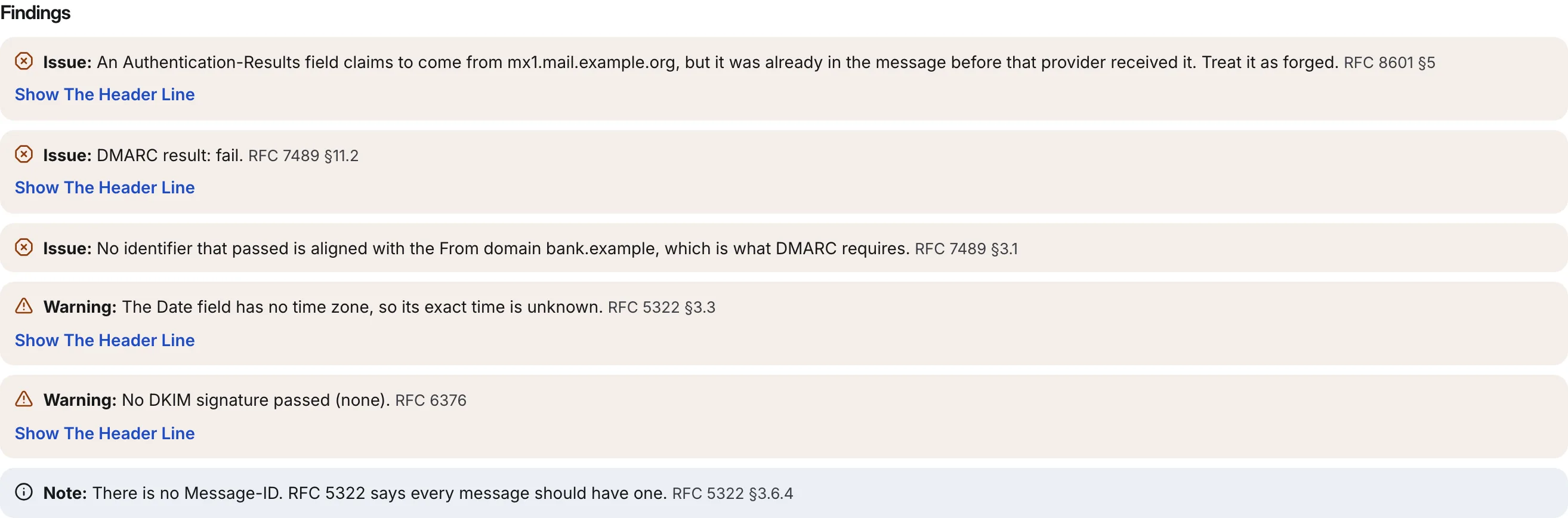
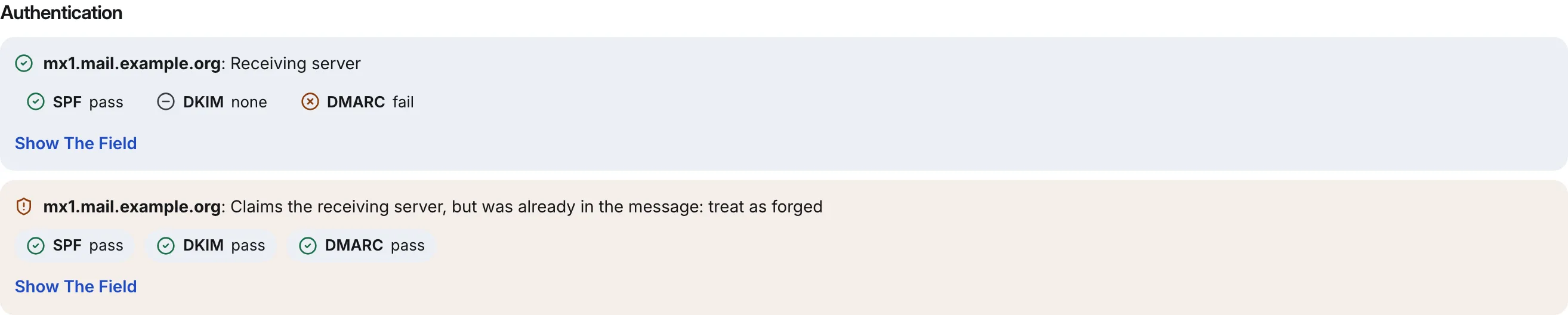
Now read below the entry point. The second Authentication-Results field claims to come from mx1.mail.example.org and says everything passed. But it sits below the line where mx1.mail.example.org first received the message, so it was already in the message when the provider got it. It is forged. A provider that follows RFC 8601 removes such fields, but not every one does, which is how a reader ends up seeing a convincing dmarc=pass. Keep this table nearby whenever you check email headers for spoofing:
| Sign | Where to look | What it tells you |
|---|---|---|
dmarc=fail from your provider | Its own Authentication-Results | The From domain did not authorise this message |
An Authentication-Results naming your provider below the entry point | Under the first Received line your provider wrote | Added by the sender: treat as forged |
From domain unlike both the Return-Path and DKIM d= domains | From, Return-Path, DKIM-Signature | Nothing ties the message to the domain it claims |
| Reply-To on a third domain | Reply-To | Replies go somewhere other than the sender shown |
| Date with no time zone, or no Message-ID | Date, Message-ID | Hand-built message; weak alone, telling in combination |
What Headers Cannot Tell You
When you check email headers for spoofing, they answer one question well: was this message authorised by the domain in its From address? They cannot tell you whether that domain is the one you think it is. A lookalike domain registered last week can publish SPF, DKIM and DMARC and pass all three for itself. A display name such as Accounts Team can sit in front of any address at all. And a real account that has been taken over sends real, passing mail.
A failure can mislead in the other direction too. Forwarded mail and mailing lists break SPF and DKIM on genuine messages, and a domain with p=none asks receivers not to act on failures at all. So treat a DMARC fail as a strong reason for suspicion and a pass as one piece of evidence, then judge the message by what it asks you to do.
Email Spoofing Questions
Can A Spoofed Email Pass SPF?
Yes, easily. SPF checks the envelope sender's domain, shown in Return-Path, not the From address you see. A spoofer sends from a server they control, with their own domain as the Return-Path, and SPF passes for that domain. That is why the example above shows spf=pass next to dmarc=fail: DMARC is the check that ties the result to From.
Does DMARC Pass Mean An Email Is Safe?
No. A DMARC pass from your own provider means the message really was sent with the permission of the domain in From. It says nothing about whether that domain is trustworthy, whether the account was compromised, or whether the link inside is safe. A lookalike domain with a correct DMARC record passes too.
Can I Trust The Sender IP In The Headers?
Trust the one in the entry-point line, the first Received line your provider wrote, because your provider saw that connection itself. Addresses in lines further down were written outside your provider and could be invented. Even the trusted address usually belongs to the sending service's mail server, so it identifies a service to complain to, not a person.
Can Someone Spoof My Own Domain?
They can put it in From, and whether receivers accept the result depends on your DMARC policy. With no DMARC record, or p=none, receivers decide alone. With p=quarantine or p=reject, you ask them to filter or refuse mail that fails. Start at p=none with reports, fix your own senders, then tighten the policy.
How Eklow Handles This
The free email header analyzer lets you check email headers for spoofing with the five steps above done in one pass. It finds the hop where the message entered the receiving provider and uses only that provider's Authentication-Results for the verdict. An Authentication-Results field that claims to be from the receiver but was already in the message when it arrived is reported as forged, citing RFC 8601 §5, with the exact header line one click away. Fields added by other servers are shown, but labelled as not verified.
The alignment section then shows whether the Return-Path and each DKIM domain match the From domain, strictly or relaxed, and whether they passed. The analyzer never calls a message safe or spoofed. It reports what the headers prove and leaves the judgment to you, which is the honest limit of header analysis.
If the domain being spoofed is yours, the fix is DMARC, and that is where Eklow starts with every sending domain. A domain only verifies once its SPF and DMARC records resolve and every DKIM record Eklow lists for it is published, and campaigns never send from a mailbox whose domain is not verified. The DMARC record Eklow suggests starts at p=none with aggregate reports switched on, so you can see who sends as your domain before you tighten the policy. The domain verification guide lists each record, and SPF, DKIM and DMARC explained for founders explains how the three work together.
Keep reading
- DeliverabilityIs My Domain Hurting My Deliverability? A Domain Reputation Check, Signal By SignalHow to check your domain's reputation as an email sender: the public signals receivers can see, how to read each one by hand, and what to fix first when your domain is the problem.5 min read
- AIConnect Your Outreach Data To An AI Assistant Over MCPWhat you can ask an AI assistant about your campaigns, replies, mailboxes and domains once it is connected over MCP, and the security model that keeps it read-only and inside one workspace.3 min read
